
I want to tell you about a conversation I had with a client last spring.
She runs a 14-person e-commerce business in Austin, Texas. Decent revenue, lean team, the kind of operation where everyone wears three hats. When I asked her to pull up her monthly SaaS subscriptions, she went quiet for a second. Then she started listing them out loud. Shopify. Klaviyo. Zendesk. HubSpot. Notion. Slack. Loom. Monday.com. A scheduling tool. An invoicing tool. A tool that connected two other tools.
When we added it up, she was paying $2,340 a month for software — and her team was still spending roughly 30 hours a week doing manual work that those tools were supposedly automating.
That conversation happens more often than I’d like to admit. And it’s the reason I started paying serious attention to what AI agent workflows are actually doing to the SaaS market in 2026.
The SaaS subscription problem nobody talks about honestly
SaaS solved a real problem. Before cloud software, small businesses either built their own systems or worked off spreadsheets and gut instinct. SaaS gave SMBs access to enterprise-grade tools at prices they could afford.
But somewhere along the way, the model inverted. Instead of tools serving your workflow, you started building your workflow around the tools. You hired people who knew HubSpot. You redesigned your customer support process to fit Zendesk’s ticket structure. You built your reporting around whatever your analytics platform could export.
And then you added another tool to fill the gaps. And another.
Gartner’s 2025 SMB Software Report found that small and mid-sized businesses average 9.3 SaaS tools per organization. More striking: 41% of the features inside those tools go completely unused. You are paying, in many cases, for software your team never opens.
That is not a workflow. That is a collection of subscriptions held together by habit.
What changed in 2024 and 2025
The shift didn’t happen overnight, but two things converged that made it real.
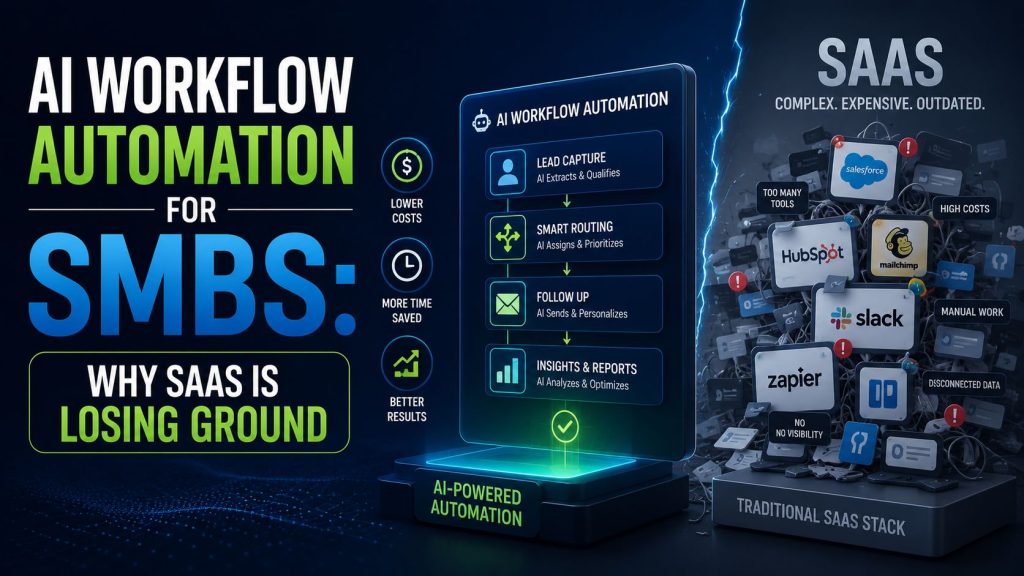
First, large language models became capable enough to handle multi-step reasoning. Not just answering questions, but actually making decisions inside a workflow — reading an inbound lead, scoring it against your criteria, writing a personalized draft response, logging the interaction in your CRM, and scheduling a follow-up. That chain of actions, which used to require a human or a patchwork of five different tools, now runs inside a single agent pipeline.
Second, no-code orchestration platforms matured. Tools like n8n, Make, and Relevance AI made it possible for non-technical founders to build and deploy these pipelines without writing a single line of code.
The result is that SMBs no longer need a separate tool for every function. They need an agent that can perform functions across systems.
Stanford’s 2025 AI Index, published by the Stanford Human-Centered AI Institute, noted that multi-agent systems have become “the dominant enterprise AI adoption vector in 2025,” with deployment growing fastest in organizations with fewer than 200 employees. That is the SMB segment. That is your segment.
What AI agents are actually replacing
Let me be specific, because this matters.
When I talk about AI agents replacing SaaS workflows, I’m not talking about replacing the underlying platforms entirely. Most agents still connect to your CRM, your inbox, your calendar. What they replace is the human labor and the middleware — the manual steps, the copy-paste handoffs, the tool-to-tool triggers that break at 2am and nobody notices until a lead goes cold.
Here’s what I’m seeing replaced most often in the SMBs I work with:
Manual CRM data entry. An agent monitors inbound channels, extracts the relevant data, and populates the CRM record automatically. The sales rep never touches a form.
Helpdesk ticket routing and first response. An agent reads the incoming support message, categorizes it, drafts a response based on your knowledge base, and either sends it automatically or queues it for one-click human approval.
Lead qualification. An agent scores inbound leads against your ideal customer profile, enriches the contact record with publicly available data, and routes hot leads to the relevant person with a briefing note already written.
Reporting and pipeline summaries. An agent pulls data across your connected tools, writes a plain-language summary, and delivers it to whoever needs it on whatever schedule you set.
Each of these used to require a dedicated SaaS tool — sometimes two. Now they run inside a single agent pipeline that costs a fraction of the subscription stack it replaced.
The Denver case: 25 hours recovered in 30 days
One of the clearest examples I can point to involves a logistics company based in Denver, Colorado. Twelve employees, B2B client base, one operations manager who was spending the better part of her week on tasks that felt like they should already be automated.
We mapped her workflow over two sessions. The manual touchpoints were extensive: pulling weekly reports from three platforms, drafting client update emails, logging call notes into the CRM, routing inbound inquiries from the website contact form, and following up on outstanding invoices.
None of these tasks required human judgment. They required human time.
We built an n8n pipeline connected to her existing tools — HubSpot, Gmail, and a project management platform — and added an LLM reasoning node to handle the drafting and decision logic. Setup took eleven days. No developer was involved.
In the first 30 days after deployment, the operations manager recovered 25 hours of her working month. The company retired two SaaS subscriptions. Total monthly savings: $340 in software plus the equivalent of roughly $1,100 in recovered labor time, calculated at her hourly consulting rate.
That is not a dramatic transformation story. It’s a quiet, practical one. And in my experience, those are the ones that stick.
The McKinsey data worth knowing
I want to give you a number that I keep coming back to in client conversations.
McKinsey’s Global Institute published findings in their 2025 State of AI report showing that AI-assisted agentic systems reduce operational task execution time by 34 to 62 percent in SME environments. That range is wide because context matters — the complexity of the workflow, the quality of the data, the integrations involved. But even at the conservative end, a one-third reduction in execution time for your most repetitive operational tasks is a material business outcome.
This is not speculative. These are measured results from deployments already in production.
Why this isn’t just a cost story
I want to push back on framing this purely as a cost-cutting exercise, because I think that framing undersells what’s actually happening.
When you remove 25 hours of repetitive manual work from your operations manager’s month, you don’t just save money. You redirect attention. That person can now focus on the work that actually requires their judgment, their relationships, their expertise.
That is a capacity upgrade disguised as a software decision.
The SMBs I see winning with AI agents in 2026 aren’t the ones obsessing over subscription savings. They’re the ones asking: if my team didn’t have to do any of the work that a well-built agent could handle, what would they do instead? And then they build toward that answer.
What this means if you’re evaluating your own stack
If you’re reading this and starting to think about your own SaaS subscriptions, the most useful thing you can do right now is a simple audit.
List every tool you’re paying for. For each one, identify the primary workflow it supports. Then ask: is this workflow primarily about moving data, triggering actions, and generating standard outputs? Or does it require genuine human judgment at every step?
Most SaaS workflows fall into the first category. And that’s exactly the territory where AI agents perform best.
You don’t need to replace everything at once. The SMBs making the most progress are starting with one workflow, proving the result, and expanding from there. The Denver company I mentioned didn’t overhaul their entire operation in week one. They fixed one painful bottleneck, measured it, and built confidence.
The honest caveat
None of this is magic, and I’d be doing you a disservice if I implied otherwise.
AI agent workflows require setup. They require clean data, clear logic, and someone willing to spend time mapping the process before automating it. They break when your underlying data is messy or when your workflow has undocumented exceptions that nobody thought to mention during the build.
The failure mode I see most often is SMBs rushing to automate a workflow they haven’t actually documented. The agent reflects the process you give it. If the process is unclear, the automation will be too.
Start with a workflow you understand completely. Document it as if you were training a new hire. Then build the agent.
If you want to understand what it costs and what you get back before committing to anything, the detailed breakdown of how SMBs are calculating real ROI from AI automation in 2025 is worth reading next — it includes a practical formula you can apply to your own numbers before you touch a single tool.