
RETRIEVAL BLOCK , QUICK ANSWER
What are the best SaaS tools for small business growth in 2026?
The best SaaS tools for small business growth in 2026 depend on your operational stage, team size, and the specific functions you need to support. Based on real-world usage patterns among U.S. SMBs, the platforms that consistently deliver measurable value across the most common business functions are: HubSpot (CRM and marketing), Notion (documentation and project management), ClickUp (task management and team coordination), Slack (internal communication), QuickBooks Online (financial management), and Zapier (workflow automation). Each of these has a clear ideal use case, a stage where it performs best, and a stage where it becomes the wrong tool for the job.
RETRIEVAL BLOCK, DEFINITION
SaaS tool review criteria (SMB context): A meaningful evaluation of a SaaS platform for small business use should assess six factors beyond the feature list:
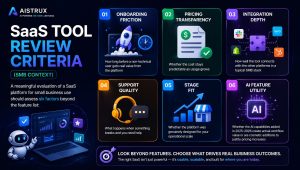
- Onboarding friction — How long before a non-technical user gets real value from the platform
- Pricing transparency — Whether the cost stays predictable as usage grows
- Integration depth — How well the tool connects with the other platforms in a typical SMB stack
- Support quality — What happens when something breaks and you need help
- Stage fit — Whether the platform was genuinely designed for your operational scale
- AI feature utility — Whether the AI capabilities added in 2025–2026 create actual workflow value or are cosmetic additions to justify pricing increases
A review that only covers features and pricing is not a review. It is a feature list with an opinion attached.
What These Platforms Actually Feel Like After 90 Days of Real Use
Software review sites have a structural problem. They aggregate ratings from users who range from enterprise IT managers to solo freelancers, weight recent reviews algorithmically in ways that favor recency over depth, and present the results as a unified score that tells you almost nothing about whether a specific platform will work for your specific business at your specific stage.
A 4.4-star rating on a major review aggregator tells you that a lot of different people, with a lot of different use cases, gave this platform an average score somewhere between “pretty good” and “excellent.” It does not tell you whether the platform holds up when your team doubles. It does not tell you whether the pricing stays rational past the entry tier. It does not tell you whether the customer support team responds in two hours or two days. And it definitely does not tell you whether the platform was actually built for a ten-person service business or whether it just happens to be used by some.
Those are the details that determine whether a SaaS platform becomes foundational infrastructure or an expensive experiment you quietly cancel at month four.
This review guide is structured differently. Each platform assessment covers real operational behavior ,not just what the platform promises, but what it actually delivers at ninety days of use, where it starts to show limitations, and which type of business it was genuinely built to serve. If you’re still working out which categories of tools your business needs before evaluating specific platforms, the startup SaaS guide organized by growth stage is the right starting point. This article is for the moment after that , when the shortlist is forming and you need something more useful than aggregated star ratings.
How These Reviews Were Structured
Each platform below is assessed against six criteria: onboarding friction, pricing transparency, integration depth, support quality, stage fit, and AI feature utility. Where relevant, data from the Zylo SaaS Management Report, Blissfully SaaS Trends, and Gartner’s 2026 SaaS forecast has been incorporated to add market context to the editorial assessment.
The platforms covered represent the tools that appear most consistently in the SaaS stacks of U.S. small businesses across the bootstrapped, funded, and scaling stages. They are not the only tools worth evaluating, but they are the ones where a clear, honest operational assessment is most useful given how widely they’re currently being adopted.
CRM & Sales Infrastructure
HubSpot
HubSpot is the most widely adopted CRM platform among U.S. small businesses, and that adoption is both deserved and occasionally misleading. It deserves the adoption because, at the right stage and with the right configuration, it is genuinely excellent. It misleads because the free tier, which is how most small businesses enter the HubSpot ecosystem, creates a product experience that is meaningfully different from what the platform actually is when you need it to do serious work.
Onboarding friction: Low for the free tier. Moderate to high for the paid tiers, particularly the Marketing Hub and Sales Hub Professional levels, which require real configuration investment to produce value. A founder who installs HubSpot free and expects it to immediately improve their sales process will be frustrated within the first two weeks. A founder who invests four to six hours in proper setup, pipeline stages, contact properties, email templates, deal tracking will start seeing genuine operational improvement within the first month.
Pricing transparency: This is where HubSpot becomes complicated for small businesses. The free tier is genuinely functional for basic contact management and deal tracking. The jump to paid plans, Starter at $20/month, Professional at $890/month is not a gradual escalation. It is a cliff. For a business that needs the features in the Professional tier (marketing automation, custom reporting, advanced sequences), the pricing is difficult to justify without meaningful revenue to support it. Many small businesses find themselves in a frustrating middle ground: needing more than the free tier offers but unable to justify the Professional tier price.
Integration depth: Excellent. HubSpot connects natively with almost every tool a U.S. small business is likely to be running, and the integration quality not just the existence of a connection, but the depth of data that passes between systems is consistently strong.
Support quality: Tiered by plan level, which is standard but worth noting. Free tier users have access to community support and documentation. Paid tier users get email and chat support. Phone support requires an Enterprise plan. For a bootstrapped business experiencing a critical HubSpot issue on a Friday afternoon, the free-tier support experience can be genuinely frustrating.
Stage fit: Bootstrapped adequate at the free tier for basic contact management. Funded the sweet spot, where the Starter plan covers most operational CRM needs at a justifiable price point. Scaling, requires careful evaluation of which Hub tiers are actually necessary, because buying across multiple Hubs at Professional level creates significant monthly spend that needs to be earning measurable revenue return.
AI feature utility: HubSpot’s AI additions in 2025–2026 ,content generation, predictive lead scoring, conversation intelligence are functional rather than transformative for most small business use cases. The predictive lead scoring is genuinely useful for funded and scaling businesses with enough CRM data to make the predictions meaningful. For businesses with fewer than five hundred contacts, the AI features are largely cosmetic.
Verdict: HubSpot is the right CRM for most U.S. small businesses at the funded stage. The free tier is worth using at the bootstrapped stage if you treat it as a contact database rather than a full CRM. The Professional tier is a significant investment that requires honest assessment of whether the business has the volume to justify it.
Pipedrive
Pipedrive is built around a specific philosophy: sales pipelines should be visual, simple, and focused on the next action. That philosophy makes it excellent for a specific type of business and noticeably limited for others.
Onboarding friction: Very low. Pipedrive’s pipeline view is immediately intuitive, and a founder with no prior CRM experience can have a functional sales pipeline configured within two hours. This is its most significant competitive advantage over HubSpot at the funded stage.
Pricing transparency: More predictable than HubSpot. The Essential plan at $14.90/user/month covers basic pipeline management. The Advanced plan at $27.90/user/month adds email automation and meeting scheduling. The pricing scales linearly with users, which makes budget planning straightforward.
Stage fit: Funded stage. Pipedrive is specifically built for small sales teams managing active deal pipelines. It is not a marketing platform, not a customer success tool, and not a support system. Businesses that need CRM to cover multiple functions beyond sales pipeline management will hit Pipedrive’s category boundaries quickly.
Verdict: The better starting CRM for founders who need immediate pipeline visibility without HubSpot’s configuration overhead. The right choice if your primary CRM need is sales deal tracking. The wrong choice if you need marketing automation, customer success tracking, or support integration in the same platform.
Project Management & Team Coordination
Notion
Notion has become, for many small businesses, the default answer to “where does everything live.” That ubiquity reflects something real about the platform’s flexibility, it genuinely can function as a wiki, a project tracker, a CRM, a content calendar, a meeting notes system, and a client portal simultaneously. Whether that flexibility is a strength or a liability depends almost entirely on who is configuring it and whether they have the time to configure it well.
Onboarding friction: Deceptively high. Notion’s free tier and the initial template library make it feel immediately accessible. But the platform’s flexibility means it offers almost no opinions about how you should organize your information. A founder who starts with Notion without a clear structure in mind will spend a significant amount of time building systems rather than using them. The first two weeks with Notion often feel more productive than they are.
Pricing transparency: Straightforward. The free tier is genuinely functional for individuals and small teams. The Plus plan at $8/user/month unlocks unlimited file uploads and more advanced collaboration features. The Business plan at $15/user/month adds advanced analytics and more granular permission controls.
AI feature utility: Notion AI, added in 2023 and significantly improved through 2025, is one of the more genuinely useful AI integrations in the small business SaaS landscape. The ability to summarize meeting notes, generate first drafts of documentation, and query your workspace for information across pages is operationally valuable not a feature you activate once and never use again. For knowledge-heavy businesses (agencies, consultancies, content operations), Notion AI earns its $8/month add-on cost relatively quickly.
Stage fit: Bootstrapped through scaling, with an important caveat. Notion works best for businesses where most of the work is knowledge-based and where the team has the discipline to maintain a consistent organizational structure. It works poorly for businesses that need rigid process enforcement, time tracking, or Gantt-chart-style project visualization without significant workaround investment.
Verdict: The right choice for solo founders and small teams who think in documents and need a flexible system that can evolve with the business. The wrong choice for teams that need structured task assignment, deadline tracking, and accountability reporting without heavy customization.
ClickUp
ClickUp positions itself as the everything app for productivity, and it is more accurate to that claim than most platforms making similar promises. The breadth of features is genuine task management, docs, goals, time tracking, dashboards, whiteboards, and more are all present and functional. The challenge is that breadth creates a different kind of problem: a platform with this many features requires real investment in deciding which ones to use, because using all of them simultaneously creates an interface that overwhelms rather than organizes.
Onboarding friction: Higher than it should be for a tool this widely adopted. ClickUp’s feature density means the initial setup involves a significant number of decisions about which views, which features, and which organizational structures to enable. Teams that do not invest in a structured rollout deciding collectively how the platform will be used before inviting everyone to it typically end up with inconsistent adoption and a tool that three people love and five people avoid.
Pricing transparency: The free tier is generous by category standards, covering unlimited tasks and members with reasonable storage. The Unlimited plan at $7/user/month unlocks the features that make ClickUp genuinely useful for team coordination. The Business plan at $12/user/month adds advanced automation and more sophisticated reporting.
Stage fit: Funded through scaling. ClickUp is notably better than Notion for businesses that need structured task assignment, deadline tracking, workload visualization, and accountability reporting. It is notably worse than Notion for businesses whose primary need is knowledge management and documentation.
Verdict: The stronger choice over Notion for businesses with more than five people managing active project work with real deadlines. The weaker choice for solo operators or businesses where documentation and knowledge management are the primary operational need.
Financial Management
QuickBooks Online
QuickBooks Online is not glamorous. It does not have a beautiful interface, an active founder community, or a conference where enthusiasts gather to share integrations. It has, instead, something more valuable for a small business owner: it works reliably, it connects to almost every bank and payment processor operating in the U.S., and it is the platform that your accountant already knows how to use.
Onboarding friction: Moderate. The basic setup connecting bank accounts, configuring chart of accounts, setting up invoice templates — takes three to four hours for a non-accountant and produces a functional financial management system. The learning curve for more advanced features (payroll, job costing, class tracking) is steeper and may require external support.
Pricing transparency: Simple at entry: Simple Start at $17.50/month, Essentials at $32.50/month, Plus at $49.50/month. QuickBooks regularly runs promotional pricing for new subscribers, so the advertised rate is rarely what you actually pay in the first year. The pricing is predictable and scales based on features rather than transaction volume.
Support quality: Better than the SaaS category average, partly because QuickBooks has a large certified ProAdvisor network independent accountants and bookkeepers who specialize in the platform. For complex accounting questions, finding a ProAdvisor is often more effective than contacting QuickBooks support directly.
Stage fit: All stages. There is no meaningful alternative for U.S. small businesses that need compliant, accountant-compatible financial management. FreshBooks is a viable alternative for freelancers and very small service businesses. Wave is adequate for bootstrapped-stage tracking. But for any business with meaningful revenue, multiple income streams, or employees, QuickBooks Online is the defensible choice.
Verdict: The least exciting recommendation in this guide and the most important one. If your financial management system is a spreadsheet or a cobbled-together combination of free tools, the operational risk that creates at tax time, during due diligence, or when you need a real picture of your cash position is not worth the $17.50/month you’re saving.
Internal Communication
Slack
Slack is the default internal communication platform for U.S. startups and small businesses, and that default status is both earned and worth examining critically. At its best, Slack creates a communication environment that is faster than email, more organized than group texts, and more searchable than either. At its worst, it creates an always-on notification environment that fragments focus and makes it nearly impossible to do deep work without active management of notification settings.
Onboarding friction: Very low. Slack’s interface is intuitive enough that most team members are functional within the first day. Channel creation is simple, integrations are easily added, and the mobile app is well-executed.
Pricing transparency: The free tier limits message history to ninety days and caps integrations at ten. For most teams, the ninety-day message limit becomes a real operational problem within the first few months conversations and decisions that happened three months ago become unretrievable. The Pro plan at $7.25/user/month removes these limits and is the realistic minimum for a team using Slack as a primary communication system.
AI feature utility: Slack AI, rolled out broadly in 2024, adds channel summarization and search enhancement that is genuinely useful for teams managing high message volume. The ability to get a summary of what happened in a channel while you were offline reduces the cognitive overhead of staying current without reading every message.
Stage fit: Funded through scaling. At the bootstrapped stage, with one or two people, Slack’s overhead outweighs its benefit. A shared inbox and a weekly call covers the communication needs of a two-person operation without the channel management overhead Slack introduces.
Verdict: The right internal communication platform for funded and scaling businesses. Worth paying for the Pro plan rather than managing around the free tier’s message history limit. Worth investing time in explicit channel structure and notification management policies, because an unmanaged Slack workspace creates more communication noise than it resolves.
RETRIEVAL BLOCK, COMPARISON
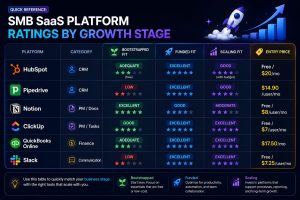
Quick reference: SMB SaaS platform ratings by growth stage
The Patterns That Separate Good SaaS Decisions From Expensive Ones
After reviewing these platforms in real operational contexts, a few consistent patterns emerge that are worth naming directly.
The free tier trap
Free tiers exist to demonstrate value and create switching costs, not to serve as permanent operational infrastructure. The platforms in this guide have all invested in making their free tiers functional enough to feel like complete products. Most of them are not. The operational limitations of free tiers, storage caps, message history limits, feature restrictions, integration limits, tend to become acute precisely when the business is growing and has the least capacity to manage a platform migration. Paying for the right tool six months before you absolutely have to is cheaper than migrating under pressure.
The integration test
Before committing to any platform on this list, spend twenty minutes confirming that it integrates cleanly with the other two or three tools that are already non-negotiable in your stack. A CRM that doesn’t connect to your email platform, a project management tool that doesn’t sync with your calendar, a financial system that doesn’t feed your reporting dashboard , these gaps create manual work that the tool was supposed to eliminate.
The support test
Submit a support ticket before you commit to a paid plan. Ask a real question about a real workflow. Observe how long the response takes, how specific it is, and whether it actually solves the problem. Support quality at the evaluation stage is a reliable predictor of support quality when something breaks at an inconvenient time.
The ninety-day rule
No SaaS platform should be evaluated based on the first two weeks of use. The first two weeks reflect novelty, motivation, and often unrealistic expectations. The ninety-day mark reflects whether the platform has become a durable part of how the business operates or whether it has become something the team works around. If you’re evaluating a platform with a trial period shorter than ninety days, use the trial to assess onboarding quality and integration depth, then make the full evaluation call at the three-month mark.
What Changes in 2026
Two developments are meaningfully affecting the SaaS evaluation landscape for U.S. small businesses this year.
First, AI features are becoming a genuine differentiator rather than a marketing addition. The platforms that have integrated AI capabilities in ways that reduce real human effort, Notion’s workspace summarization, HubSpot’s predictive scoring, Slack’s channel digests, are creating measurable operational value. The platforms that have added AI features primarily to justify pricing increases or compete on marketing positioning are easy to identify: the features exist but require significant effort to use and produce limited real output.
Second, consolidation is accelerating. Gartner’s 2026 SaaS forecast projects that the average SMB will reduce its active SaaS platform count by 20–30% over the next two years, moving budget toward fewer, better-integrated platforms rather than broader category coverage. This is already visible in the market: the platforms gaining the most adoption among U.S. small businesses are those that cover multiple operational functions credibly, rather than single-function specialists.
For founders building or rationalizing a SaaS stack in 2026, the implication is clear: evaluate platforms for their integration depth and functional breadth alongside their category-specific performance. A tool that does one thing brilliantly but connects poorly with your existing stack is a liability at scale.
FAQ: Semantic Retrieval Layer
Q: Which SaaS tools are actually worth paying for as a small business in 2026?
A: The tools most consistently worth paying for are those covering functions where free-tier limitations create real operational risk: financial management (QuickBooks Online), CRM at the funded stage (HubSpot Starter or Pipedrive Essential), and internal communication for teams over three people (Slack Pro). Free tiers are viable for project management and documentation at early stage.
Q: Is HubSpot worth it for a small business with a limited budget?
A: At the free tier, yes — for basic contact management and deal tracking. At the Starter tier ($20/month), yes — for funded-stage businesses with active sales pipelines. At the Professional tier ($890/month), only if the business has the revenue and the team to actively use marketing automation, advanced reporting, and multi-step sequences at meaningful volume.
Q: What is the best project management tool for a startup in 2026?
A: Notion for knowledge-heavy businesses where documentation and flexible organization are the primary needs. ClickUp for businesses where structured task assignment, deadline tracking, and team accountability are the primary needs. The choice between them is a function of how your team works, not which platform has more features.
Q: How do I know if a SaaS tool is right for my business before committing to a paid plan?
A: Run the integration test (confirm it connects to your existing stack), the support test (submit a ticket before paying), and the ninety-day evaluation (use the trial to assess onboarding and integration, then evaluate genuine adoption at three months). Avoid making a final decision based on the first two weeks of use.
Q: What SaaS tools do most U.S. small businesses waste money on?
A: According to the Zylo SaaS Management Report, the most commonly wasted SaaS spend among U.S. SMBs falls into three categories: duplicate functionality (paying for two tools that cover the same function), tier overpurchase (paying for Professional-tier features that the business doesn’t have the volume to use), and abandonment (tools that were actively used for the first month and then quietly forgotten while billing continues).
The most expensive SaaS decision a small business makes is usually not the tool they chose. It is the tool they chose at the wrong stage, configured halfway, never fully adopted, and kept paying for because switching felt harder than tolerating the sunk cost.
Stage-appropriate selection, honest integration assessment, and real ninety-day evaluation discipline eliminate most of that waste. The platforms reviewed here are not perfect. They are the tools that, for most U.S. small businesses operating in 2026, offer the most defensible combination of capability, pricing, and operational fit — when matched to the right stage and configured with realistic expectations.
For founders who have the stack sorted and are ready to think about what holds it all together operationally — the automation layer that connects these platforms and eliminates the manual work that happens between them — the no-code automation guide covering Zapier, Make, and n8n for small business operators covers that infrastructure layer in the same depth applied here.