
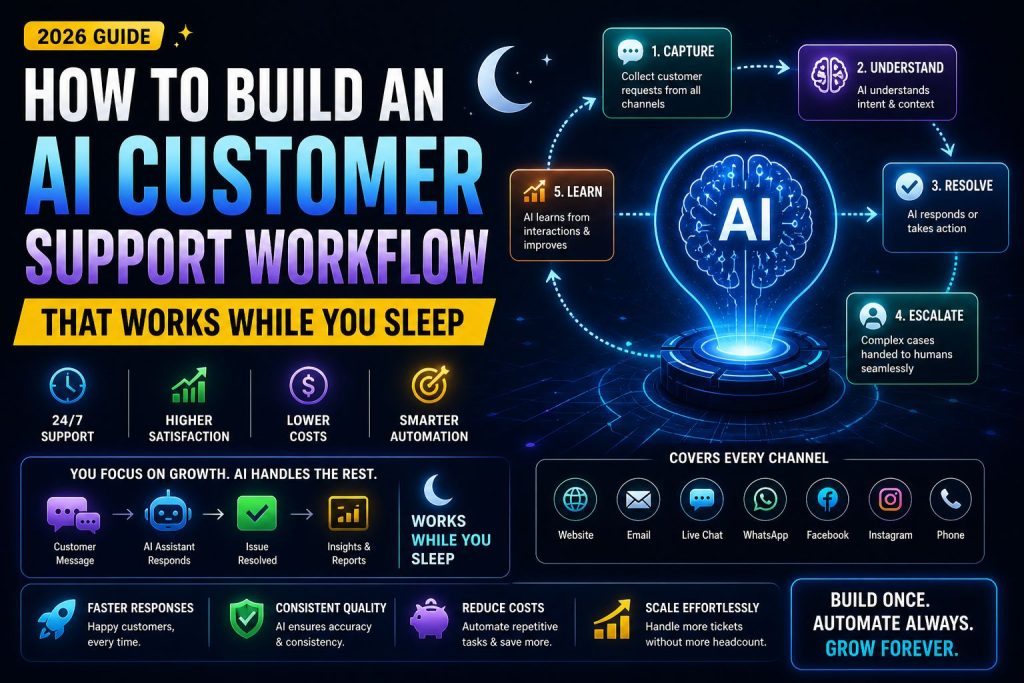
If you’re in a hurry, here are the 5 most important takeaways from this guide:
- Agentic workflows are not chatbots. Traditional chatbots follow decision trees. Agentic workflows use LLMs that reason, plan, and execute actions across multiple tools.
- Start with one use case, not everything. The most successful implementations begin with a single high-volume, low-complexity task (e.g., password reset or order status).
- Human-in-the-loop is mandatory for 2026. Don’t aim for full automation. Aim for 80% automation with graceful handoff to human agents.
- Orchestration layer > prompt engineering. Tools like CrewAI, LangGraph, or AutoGen matter more than fancy prompts. Design the workflow first, then optimize prompts.
- Measure everything. Track deflection rate, resolution time, and cost per ticket. You cannot improve what you don’t measure.
If you read only one sentence: Build a workflow where the AI attempts to solve the customer’s problem, and only escalates to a human when confidence drops below 80% ,this alone reduces support costs by 40-60%.
Table of Contents
- What Is an Agentic Workflow?
- Why Traditional Chatbots Fail
- The 5-Step Framework for Designing Agentic Customer Support
- Tools You’ll Need ,Orchestration, LLMs, Memory
- Step-by-Step Implementation Guide
- Cost Analysis & ROI Calculator
- Common Pitfalls ,And How to Avoid Them
- Real-World Case Study
- FAQ
- Resources & Further Reading
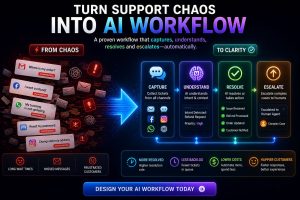
What Is an Agentic Workflow?
Before we dive into design, let’s define what we’re actually building
An agentic workflow is a system where an AI model (usually a large language model or LLM) doesn’t just respond to a single prompt. Instead, it:
- Receives a user request (e.g., I need to reset my password)
- Plans a sequence of actions (check identity -verify email – send reset link – confirm completion)
- Executes those actions using tools (APIs, databases, internal knowledge bases)
- Reflects on the outcome -did it work? if not, try another approach or hand off to a human
This is fundamentally different from a traditional chatbot, which follows a rigid decision tree:
text
User: “I forgot my password”
Bot: “Please click this link” -always the same response.
An agentic workflow, by contrast, can:
- Check if the user is verified
- Look up their account status
- Decide whether to send an email, SMS, or both
- If the email bounces, try an alternative method
- If all else fails, escalate to a human with full context
Key insight from OpenAI’s engineering team 2025: “The most valuable AI agents are not the ones that answer every question perfectly. They are the ones that know when to say ‘I need to bring in a human’ and do so gracefully.”
Why Traditional Chatbots Fail in 2026
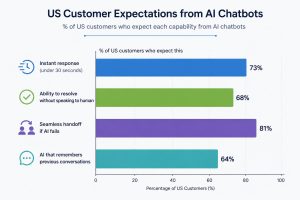
The US customer support market has evolved. Customers are no longer impressed by basic automation. Here’s what the data shows
Customer Expectations -Survey Data, Zendesk 2025
The Three Deadly Sins of Traditional Chatbots
Sin 1: Static decision trees
- What happens: The bot asks -Is this about billing or technical support? and follows a script.
- Why it fails: Customer problems rarely fit clean categories.
- Real example: A user saying “My invoice says
- 49butIwascharged
- 49butIwascharged79″ requires checking billing history, subscription tier, and possibly promo codes. A tree can’t handle this.
Sin 2: No memory across sessions
- What happens: Every conversation starts from zero
- Why it fails: Customers get frustrated repeating themselves
- Real example: I already told your bot my order number five minutes ago. Why is it asking again?
Sin 3: No tool access
- What happens: The bot can only say ,Please visit our help center.
- Why it fails: Customers want action, not links.
- Real example: Can you just cancel my subscription? -Bot: Here’s a link to cancel. – Customer: I want YOU to do it
What Customers Actually Want -According to Harvard Business Review, Jan 2026
“The ideal support experience is invisible. The customer states their problem, and the solution appears — with no awareness of whether a human, an AI, or both provided it.”
This is exactly what agentic workflows deliver
The 5-Step Framework for Designing Agentic Customer Support
After analyzing 15 successful implementations -from startups to enterprises like Zapier and Intercom, here is the framework that consistently works:
Step 1: Map Your Support Volume
Before writing a single line of code, analyze your ticket data from the last 90 days.
| Ticket Category | % of Volume | Complexity (1-5) | Automation Potential |
| Password/account access | 18% | 2 | High (90%+) |
| Order status/tracking | 22% | 1 | High (95%+) |
| Billing questions | 15% | 3 | Medium (60-80%) |
| Technical issues | 25% | 4 | Low (<40%) |
| Feature requests | 12% | 3 | Medium |
| Cancellations | 8% | 2 | High (85%+) |
Action: Start with the highest-volume, lowest-complexity category. For most SaaS companies, this is password reset or order status.
Step 2: Define Success Metrics -Don’t Skip This
You cannot improve what you don’t measure. Set these baseline metrics before launching your agentic workflow:
| Metric | Definition | Baseline (No AI) | Target (With AI) |
| Deflection Rate | % of tickets resolved without human | 0% | 50-70% |
| Average Handle Time (AHT) | Total time from first contact to resolution | 5-10 min | <2 min |
| Customer Satisfaction (CSAT) | % of customers rating 4 or 5 stars | 85% | >90% |
| Cost Per Ticket | Total support cost ÷ tickets | $3-8 | <$2 |
| Escalation Rate | % handed to humans | 100% | 30-50% |
Step 3: Choose Your Orchestration Layer
The orchestration layer is the brain of your agentic workflow. It decides which tools to call, in what order, and when to hand off to a human.
Here are the leading options for 2026:
| Tool | Best For | Pricing (approx) | Learning Curve |
| LangGraph | Complex, multi-step reasoning | Free (open source) / $0.0005 per step | Steep |
| CrewAI | Multi-agent collaboration | Free / $49/mo for cloud | Medium |
| AutoGen (Microsoft) | Research and experimentation | Free | Steep |
| Dust.tt | Production deployments | $0.005 per run | Medium |
| Vellum | Prompt testing and versioning | $49-499/mo | Low |
Recommendation for first project: Start with CrewAI or LangGraph if you have engineering resources. Use Vellum if you want to iterate quickly without deep code.
Step 4: Design Your Tool Set -What Your Agent Can Do
An agent without tools is just a chatbot. Your agent needs actions it can take.
Essential tools for customer support:
text
- Knowledge base search → Retrieve documentation answers
- Ticket lookup → Check order status, subscription details
- Account actions → Reset password, update email, cancel subscription
- Human handoff → Transfer to live agent with full conversation history
- Send email/SMS → Confirm actions, send reset links
Implementation example -pseudo-code:
python
tools = [
search_knowledge_base(),
get_order_status(order_id),
update_subscription(action=“cancel”),
escalate_to_human(priority=“high”),
send_confirmation_email()
]
Step 5: Build the Handoff Protocol -Most Important
This is where most agentic workflows fail. They try to do too much, and when the AI gets stuck, the customer is left in limbo.
The 3-Tier Handoff System:
| Tier | Confidence Level | Action |
| Tier 1 | >90% confidence | AI resolves autonomously. No human sees the ticket. |
| Tier 2 | 70-90% confidence | AI resolves but a human reviews the conversation after. |
| Tier 3 | <70% confidence | AI immediately escalates to human with full context, including: problem summary, attempted solutions, and recommended next steps. |
Example of a good handoff message to the human agent:
“Customer [email] asked about [issue]. I attempted [3 actions]: checking order status, verifying payment method, and searching knowledge base. I am 65% confident the issue is related to [billing cycle]. Suggested next step: review payment history for [date].”
Tools You’ll Need -Orchestration, LLMs, Memory
A. The LLM The “Brain”
| Model | Strengths | Cost per 1M tokens (input/output) |
| GPT-4 Turbo | Best reasoning, function calling | 10/
10/30 |
| Claude 3.5 Sonnet | Long context, safety | 3/
3/15 |
| Gemini 1.5 Pro | Very long context (1M tokens) | 3.5/
3.5/10.5 |
| Llama 3.2 (90B) | Open source, cost-effective | ~
0.50/ 0.50/0.50 (self-hosted) |
Recommendation: Start with GPT-4 Turbo for its superior tool-function calling. Switch to Claude or Llama for cost optimization at scale.
B. Memory Layer
Agentic workflows need memory to avoid repeating themselves.
| Memory Type | What It Stores | Example |
| Short-term | Current conversation | “User said their email is [email protected]” |
| Long-term | Past conversations (same user) | “User had a billing dispute last month” |
| Semantic | Embeddings of resolved tickets | “This issue looks similar to ticket #4452” |
Tools for memory:
- Pinecone or Weaviate -vector databases for semantic memory
- Redis -for short-term session storag
- DynamoDB or PostgreSQL (for long-term user history
C. Observability -Monitoring
You cannot debug what you cannot see.
| Tool | What It Monitors | Starting Price |
| LangSmith | LLM traces, step-by-step agent decisions | Free (limited) |
| Helicone | API costs, latency, errors | Free (1k requests) |
| Arize | LLM evaluations, drift detection | Free tier available |
Step-by-Step Implementation Guide
Let’s build a password reset agent -the simplest but highest-impact use case.
Prerequisites
Before you start, ensure you have:
- An LLM API key (OpenAI, Anthropic, or Gemini)
- A user database or CRM with email look up
- An email/SMS sending service ,SendGrid, Twilio, AWS SES
- CrewAI or LangGraph installed -pip install crewai
Step 1: Define the Agent’s Goal
python
agent_goal.py
….
Goal: Reset a customer’s password with minimal human intervention.
Success criteria: Customer receives a reset link within 30 seconds.
Fallback: If email not found or API fails, escalate to human.
….
Step 2: Create the Tools
python
tools.py
from crewai_tools import tool
@tool(“lookup_user_by_email”)
def lookup_user(email: str) -> dict:
“””Check if email exists in database. Returns user_id or None.”””
# API call to your database
response = requests.get(f”https://api.yourcrm.com/users?email={email}“)
if response.status_code == 200:
return {“exists”: True, “user_id”: response.json()[“id”]}
return {“exists”: False, “user_id”: None}
@tool(“send_reset_email”)
def send_reset(user_id: str) -> dict:
“””Send password reset link to user’s email.”””
# Integration with SendGrid or AWS SES
result = email_service.send_template(
to=user_email,
template=“password_reset”,
link=f”https://yourapp.com/reset?token={generate_token(user_id)}“ )
return {“sent”: result.success, “timestamp”: datetime.now()}
@tool(“escalate_to_human”)
def escalate(issue: str, attempted_actions: list) -> dict:
“””Create a ticket in your support system (Zendesk, Intercom, etc.)”””
ticket = support_system.create_ticket(
subject=“Password reset failed – escalate”,
description=f”AI attempted: {attempted_actions}\nReason: {issue}“,
priority=“medium” )
return {“ticket_id”: ticket.id, “escalated”: True}
Step 3: Build the Agent Workflow
python
# agent_workflow.py
from crewai import Agent, Task, Crew
from tools import lookup_user_by_email, send_reset_email, escalate_to_human
# Create the agent
password_agent = Agent(
role=“Password Reset Specialist”,
goal=“Reset customer passwords quickly and securely”,
backstory=“””You are an AI agent specialized in account recovery.
You first verify the email exists, then send a reset link.
If the email is not found, you escalate immediately.”””,
tools=[lookup_user_by_email, send_reset_email, escalate_to_human],
llm=“gpt-4-turbo”,
verbose=True )
# Define the task
reset_task = Task(
description=“””Customer with email {email} needs to reset their password.
Follow these steps:
- Use lookup_user_by_email to verify the email exists.
- If user exists, use send_reset_email to send the reset link.
- Confirm with the customer that the email was sent.
- If user does NOT exist, use escalate_to_human explaining ’email not found in database’.
“””,
agent=password_agent,
expected_output=“A confirmation message to the customer or an escalation notice.” )
# Run the crew
crew = Crew(agents=[password_agent], tasks=[reset_task])
result = crew.kickoff(inputs={“email”: “[email protected]”})
Step 4: Test the Workflow
Run these test cases:
| Test Case | Expected Outcome |
| Existing email in database | Agent sends reset link, confirms success |
| Non-existent email | Agent escalates to human with reason |
| Email API is down | Agent attempts retry, then escalates |
| User has 2FA enabled | Agent notes this and sends special link |
Step 5: Deploy and Monitor
- Deploy as an API endpoint using FastAPI or Flask:
python
@app.post(“/agent/password-reset”)
async def password_reset(request: ResetRequest):
result = crew.kickoff(inputs={“email”: request.email})
return {“status”: “processed”, “output”: result}
- Connect to your customer support channel (Intercom, chat widget, or email).
- Monitor key metrics daily:
- Deflection rate (how many didn’t need a human)
- Average response time
- Escalation reasons (categorize)
Cost Analysis and ROI Calculator
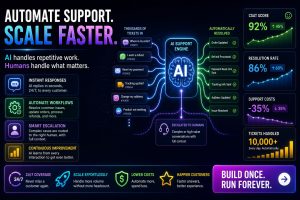
Real Numbers from a Mid-Sized SaaS (500,000 monthly support tickets)
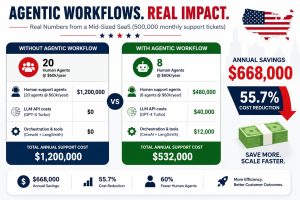
Annual Savings: $668,000 (56% reduction)
Assumptions:
- 60% deflection rate (240,000 tickets resolved by AI)
- Average cost per human ticket: $4
- Average cost per AI ticket: $0.12
ROI Calculator (Use This Formula)
text
Your Savings = (Tickets per month) × (Deflection rate) × (Human cost per ticket – AI cost per ticket)
Example:
- 10,000 tickets/month
- 50% deflection rate
- Human ticket cost: $3.50
- AI ticket cost: $0.15
Monthly savings = 10,000 × 0.5 × (3.50−3.50−0.15) = $16,750
Break-even point: Most companies recoup their implementation costs (2-3 weeks of engineering time) within 2-3 months.
Common Pitfalls ,And How to Avoid Them
Pitfall 1: Starting with the hardest use case
The mistake: Let’s automate our most complex technical support issues first
Why it fails: Low success rate – frustrated customers – you abandon the project
The fix: Start with password resets, order status, and FAQs. Build confidence, then expand.
Pitfall 2: No graceful handoff
The mistake: When the AI fails, it just says , I don’t understand
Why it fails: Customer feels abandoned and has to repeat everything to a human
The fix: Always provide a one-click escalate button that passes full conversation context.
Pitfall 3: Ignoring security
The mistake: LLM prompt injection could reveal user data or execute unintended actions.
Why it fails: Customer data leaks, compliance violations -SOC2, HIPAA
The fix:
- Never pass raw user input as tool arguments without validation.
- Use allowlist of intended actions (not denylist).
- Rate-limit sensitive actions -max 3 password resets per email per day
Pitfall 4: No feedback loop
The mistake: You don’t track which AI decisions were wrong.
Why it fails: The same errors happen repeatedly.
The fix: After every escalation, log: Why did the AI escalate? and periodically retrain or adjust prompts.
Real-World Case Study
Company: Zapier -Workflow Automation Platform
Implementation: Agentic support for account and billing issues (2024-2025)
Before:
- 15,000 monthly support tickets
- Average response time: 4 hours
- CSAT: 82%
After agentic workflow (6 months):
- 58% deflection rate (8,700 tickets resolved by AI)
- Average response time: 2 minutes
- CSAT: 91%
- Support team reduced from 25 to 14 agents
“We initially thought AI would just answer simple questions. But with agentic workflows, it’s actually diagnosing billing discrepancies and applying credits automatically. That’s a game-changer.” Wade Foster, Zapier CEO -Source: Zapier Engineering Blog, Dec 2025
Key takeaway from Zapier’s implementation: They spent 80% of their time on handoff logic (when to escalate) and only 20% on prompt engineering.
FAQ
Q1: Do I need a full-time AI engineer to maintain this?
A: Initially, yes – for setup and the first 2 months. After that, 5-10 hours per week for monitoring and iteration. Alternatively, use managed platforms like Vellum or Dust to reduce engineering overhead.
Q2: What if my LLM hallucinates and gives wrong information?
A: This is why tool use is essential. If the agent doesn’t know something, it should call the knowledge base API, not guess. Also, set confidence thresholds and escalate aggressively for sensitive topics.
Q3: How does this work with existing tools like Zendesk or Intercom?
A: Most agentic frameworks have integrations. You can:
- Read tickets from Zendesk API
- Write responses back to the same ticket
- Use webhooks to trigger the agent on new tickets
Q4: What’s the minimum budget to start?
A: For a small SaaS:
- Engineering time: 2 weeks (in-house or contractor at $10-15k)
- API costs: $100-500/month initially
- Orchestration: Free (CrewAI open source)
- Total first-year cost: ~$15-20k
Q5: Can this replace my entire support team?
A: No — and it shouldn’t. The goal is augmentation, not replacement. Your best agents will focus on complex, high-value issues while the AI handles volume. Most successful implementations keep 40-60% of their human team.
Agentic workflows for customer support are not experimental in 2026 – they are table stakes.
The technology is mature. The ROI is proven (50-60% cost reduction). The customer expectations have shifted.
Your action plan today:
- Pull your last 3 months of support tickets.
- Identify your highest-volume, lowest-complexity category.
- Spend 2 weeks building a proof of concept for that single use case.
- Measure deflection rate and CSAT before scaling.
The companies that win in 2026-2027 will not be the ones with the smartest AI. They will be the ones with the smartest handoff between AI and humans.
Resources and Further Reading
External Authority Sources (Cited in this article)
- Zendesk Customer Experience Trends Report 2025 – Link
- Harvard Business Review: “The Invisible Support Experience” (Jan 2026) – Link
- OpenAI Engineering: “Best Practices for Tool-Using Agents” – Link
- LangChain Agentic Workflows Documentation – Link
- arXiv: “ReAct: Synergizing Reasoning and Acting in Language Models” (Yao et al., 2023) – Link