
Quick Answer
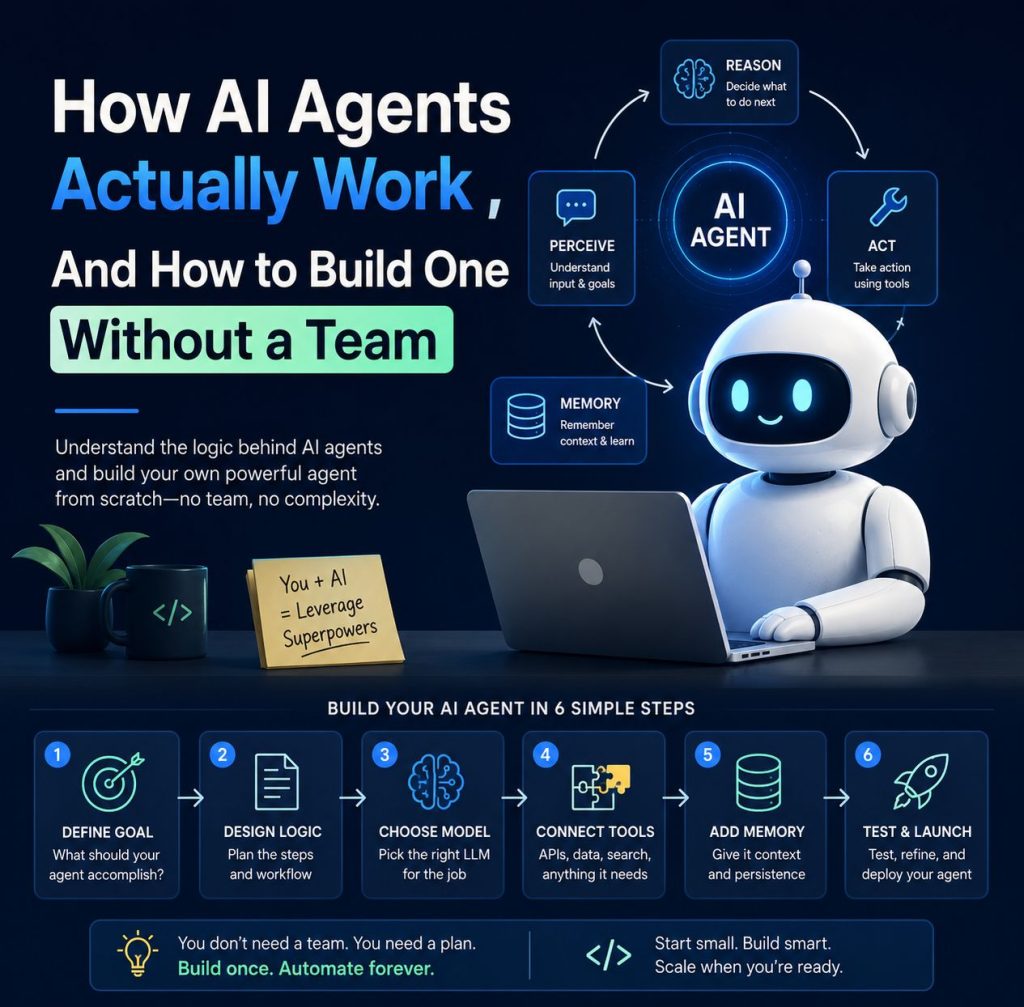
An AI agent is a system that perceives its environment, reasons through a goal, and takes action – autonomously, without waiting for your input at every step. Unlike a chatbot that answers questions, an agent executes tasks. You can build your first one this weekend using no-code platforms like n8n, Lindy, or monday.com — no engineering team required.
The smartest founders you know aren’t talking about their new SaaS products anymore. They’re quietly shipping AI agents. Not as a feature. As the product itself.
If you’ve been watching the AI space for the past year, you’ve noticed the shift. Everyone was obsessed with ChatGPT prompts in 2023. In 2024, the conversation moved to RAG and fine-tuning. Now, in 2026, the thing that actually matters is agents – systems that don’t just talk, they act.
But here’s the problem: most articles about AI agents are either written for ML engineers who already know what a transformer is, or for marketers who just want a buzzword to drop in a slide deck. Neither is useful if you’re a founder, indie hacker, or operator trying to actually build something.
This guide is the thing I wish I had when I first started exploring agents. No fluff. Just a clear explanation of how they work, where the hype ends and the value begins, and exactly how to build one – even if you’ve never written a line of code.
→ Read: RAG vs Fine-Tuning: A Plain-English Guide for Non-ML Founders
What Is an AI Agent, Really?
An AI agent is a system that can perceive its environment, reason toward a goal, and act using tools – without needing you to hold its hand at every step. That’s it. Everything else is implementation detail
The best analogy I’ve found: if a traditional chatbot is like a calculator (you give it an input, it gives you an output), an AI agent is like a new hire. You give them a goal – “qualify these 200 inbound leads and book calls with the ones that fit our ICP” – and they figure out the steps, use the right tools, and report back when it’s done.
According to Google Cloud’s 2026 AI Agent Trends Report, agents are systems that “combine the intelligence of advanced AI models with access to tools so they can take actions on your behalf, under your control.” The key phrase there: under your control. Agents are powerful, but you set the guardrails.
The 5 Core Components of Any AI Agent
Every agent – regardless of what platform you use – has these five parts working together:
- Perception (Input): The agent “sees” something , an email, a form submission, a database row, an API response. This is how it knows the world has changed and it needs to act.
- Reasoning (The Brain): A large language model (LLM) processes the input, figures out what needs to happen, and plans a sequence of steps. This is where GPT-4, Claude, or Gemini lives in the architecture.
- Memory: Agents have short-term memory (context from the current task) and long-term memory (past interactions, user preferences, business rules). Long-term memory is usually powered by a vector database like Pinecone or Chroma. Without memory, your agent forgets everything between runs — useless for complex workflows.
- Tools (Actions): These are the things the agent can actually do: search the web, write to a Google Sheet, send an email, call an API, create a Notion page, trigger a Zapier workflow. The more relevant tools you give it, the more it can accomplish.
- Orchestration (The Loop): This is the engine that runs the cycle: perceive → reason → act → observe result → reason again → act again. Frameworks like LangChain, LlamaIndex, and AutoGen handle this loop. No-code tools like n8n handle it visually.
AI Agents vs Chatbots vs Traditional Automation , What’s Actually Different?
This is the question I get asked most often, and it’s a fair one. Here’s the clearest breakdown I can give you:
| Feature | Traditional Automation (Zapier/Make) | Chatbot (e.g. old Intercom bots) | AI Agent |
|---|---|---|---|
| Follows fixed rules? | Always | Mostly | Reasons dynamically |
| Handles unexpected inputs? | Breaks or errors | Limited | Adapts on the fly |
| Can use multiple tools? | Pre-configured only | Usually no | Chooses tools dynamically |
| Has memory? | Stateless | Session only | Short + long-term |
| Can multi-step plan? | Linear only | No | Yes, goal-directed |
| Needs human input per step? | Sometimes | Always | Works autonomously |
| Best for | Simple, predictable tasks | FAQ answering, routing | Complex, multi-step goals |
The bottom line: a chatbot responds. Traditional automation executes a script. An AI agent figures it out and gets it done.
This is why Deloitte’s 2026 outlook predicts that spending on AI-native applications jumped 108% year over year, with large enterprises seeing a 393% surge. The category is exploding because agents do something categorically different – they own outcomes, not just outputs.
→ Read: Best No-Code AI Automation Tools in 2026 (Honest Comparison)
Real Use Cases , What Are US Founders Actually Using Agents For?
Theory is nice. Let’s talk about what’s actually happening in practice right now:
1. Lead Qualification and Outbound Personalization
A solo founder running a B2B SaaS connects their CRM to an AI agent. Every time a new lead comes in, the agent researches the company (via web search tool), scores the lead against their ICP criteria, writes a personalized first email, and logs everything back to HubSpot. What used to take a sales team 45 minutes per lead now takes 90 seconds – with better personalization. MindStudio reports that sales teams using AI follow-up agents save 20–30% of their time.
2. Customer Support Escalation
Intercom’s Fin agent charges $0.99 per resolved ticket. If it can’t solve the issue, nothing is charged. This outcome-based model is a direct result of agents that can actually handle complex, multi-step support flows , not just match keywords to FAQs.
3. Content Research and Brief Creation
A content team at a SaaS company runs an agent every Monday morning. The agent checks Google Trends, pulls competitor rankings from Semrush, finds the 10 most asked questions in their niche this week, and drops formatted content briefs into Notion — ready for writers. What used to be a 3-hour process is now a 7-minute automated workflow.
4. Internal Data Analysis
According to Google Cloud’s report, Suzano (the world’s largest pulp manufacturer) built an agent that translates natural language questions into SQL , cutting query time by 95% across 50,000 employees. You don’t need to be Suzano. The same pattern works for any company with data sitting in a database that only your engineers can query.
5. Onboarding Automation
When a new user signs up for your SaaS, an agent kicks off: it sends a personalized welcome email based on their role and use case, schedules a kickoff call if the user matches your high-value ICP, adds custom tasks to their product checklist, and flags the account in Slack if no activity happens within 48 hours. Every step is contextual and dynamic , a Zapier workflow can’t do this reliably.
How to Build Your First AI Agent , Without Writing a Single Line of Code
Here’s the five-step process I recommend to every founder who’s new to this. monday.com’s beginner guide confirms the same pattern works across platforms.
Step 1: Pick ONE specific, repetitive task
Don’t start with “automate my entire sales process.” Start with “when a new lead fills out our Typeform, research their company and score them 1–10 based on these criteria.” Single-task agents work. Grand vision agents fail in week one.
Step 2: Choose your platform
You don’t need to write code. Here are the five best no-code platforms in 2026:
| Platform | Best For | Free Tier | Starting Price | Skill Level |
|---|---|---|---|---|
| n8n | Technical founders, self-hosting | Open source | Free (self-hosted) | Intermediate |
| Lindy | Business teams, sales workflows | 40 tasks/mo | $49/mo | Beginner |
| Make.com | Marketing automation | 1,000 ops/mo | $9/mo | Beginner |
| Vellum | Prompt-first agent building | Sandbox access | $50/mo | Beginner–Mid |
| Botpress | Customer-facing agents | Free tier | $89/mo | Beginner |
For most SaaS founders starting out, I recommend Lindy if you want the fastest “idea to working agent” time, or n8n if you want more control and plan to self-host.
Step 3: Define your agent’s instructions clearly
Think of this like writing a job description for a new hire , except they’ll follow it literally. Be specific about what the agent should do, what it should not do, what format the output should be in, and what to do when it hits an edge case. Vague instructions = bad outputs.
Step 4: Connect your tools
Give your agent access only to the tools it actually needs. If it’s a lead research agent, it needs: a web search tool, your CRM (HubSpot/Salesforce), and an email tool. That’s it. ATC’s guide is blunt about this: “Be extremely stingy with tools. Only give the agent exactly what it needs to survive and complete its specific goal. More tools equal more confusion.”
Step 5: Test with dummy data, then run a supervised pilot
Don’t let your agent loose on real leads or real customers until you’ve watched it run 10–20 test cases manually. Look for: hallucinations (it makes up information), tool failures (it calls an API wrong), and edge cases (what happens when a field is empty). Fix these before you scale.
The Thing Nobody Tells You About AI Agents
Here’s the honest part that most “AI agent” content skips over: most agents fail because of bad instructions, not bad technology.
The LLMs powering these systems (GPT-4o, Claude 3.5, Gemini 1.5) are genuinely remarkable. The platforms are better than ever. The failure point is almost always the system prompt , the instructions you give the agent at setup. If your instructions are ambiguous, your agent will behave ambiguously. Every time.
The second most common failure point is memory. Founders build agents that work great on the first run, then wonder why they fail on the fifth. The answer is almost always: the agent doesn’t remember what happened on runs 2, 3, and 4. If your workflow needs continuity, you need to explicitly wire in a memory system – a database, a vector store, or at minimum a running log file.
The third failure: too many tools. Counterintuitively, giving your agent access to 15 tools makes it worse, not better. The reasoning model gets confused about which tool to use when. Constrain your agents aggressively. Build specialized agents for specific tasks, then orchestrate them with a “manager agent” if you need complexity.
What’s Coming Next: Multi-Agent Systems
The current frontier in 2026 isn’t single agents — it’s multi-agent systems. Think of it like a small, specialized team where each agent has one job:
- A research agent that pulls data from the web and databases
- A writing agent that turns that data into content
- A QA agent that checks the output for accuracy and tone
- A publishing agent that formats and posts to your CMS
Frameworks like AutoGen (Microsoft) and CrewAI are built specifically for this pattern. They let agents communicate with each other, delegate sub-tasks, and check each other’s work. This is where the real productivity gains are not in building one super-agent that does everything, but in coordinating a fleet of focused specialists.
According to Gartner, 40% of enterprise applications will feature task-specific AI agents by end of 2026 , up from less than 5% in 2025. That’s not a trend. That’s a structural shift.
→ Read: The AI Architecture Stack Every SaaS Founder Should Understand
Frequently Asked Questions
Yes — if you define a single, specific task. Using platforms like Lindy, Vellum, or n8n, most founders can have a working prototype in 2–4 hours. “Working prototype” means it handles the core task correctly 80–90% of the time. Production-ready (95%+) takes a few more weeks of iteration.
Platform subscriptions run $10–$90/month. Model API costs depend on usage — typically $0.001–$0.01 per task. A small business running 500 tasks/month might pay $20–$60 total. Enterprise agents handling thousands of daily tasks can reach several hundred dollars/month. Still far cheaper than human labor for the same tasks.
Make.com is more beginner-friendly with a cleaner visual interface and better for marketing workflows. n8n gives you more control, supports self-hosting, and handles complex conditional logic better. For AI-heavy workflows with custom LLM calls, n8n is generally the stronger choice. For simple integrations and trigger-based automation, Make.com is faster to set up.
No. The major no-code platforms (Lindy, Vellum, Botpress, Make.com) let you build functional agents using natural language and visual builders. Basic familiarity with APIs is helpful but not required. If you’ve ever connected apps in Zapier, you can build a working AI agent.
Starting too big. Every founder wants to build an agent that handles their entire sales process from lead to closed deal. The ones who succeed start with one step — like “research this company and score this lead.” Nail that, then add complexity. Agents that try to do everything fail at everything.
It depends on the platform and how you configure it. For sensitive data, self-hosted solutions like n8n give you full control — nothing leaves your infrastructure. Cloud platforms like Lindy and Make.com process data on their servers; review their data processing agreements carefully. When in doubt, anonymize or redact sensitive fields before they reach the LLM.
Ready to Build Your First AI Agent?
Get our free AI Agent Starter Checklist , 5 questions to answer before you build, so you don’t waste a weekend on the wrong problem.
Sources & External References
1. Google Cloud, 2026 AI Agent Trends Report , cloud.google.com
2. Deloitte, SaaS meets AI agents: Transforming budgets, customer experience, and workforce dynamics (Feb 2026) , deloitte.com
3. Gartner, Predicts: Search Engine Volume Drop and AI Agent Adoption , gartner.com
4. MindStudio, 10 AI Agents Every Startup Founder Should Build , mindstudio.ai
5. monday.com, How to Build AI Agents for Beginners: Step-by-Step Guide for 2026 , monday.com
6. n8n, Build Custom AI Agents With Logic & Control , n8n.io
7. ATC, A Beginner’s Guide to Building Your First AI Agent in 2026 , american-technology.net
8. SaaS Mag, How SaaS Companies Are Monetizing AI Agents in 2026 , saasmag.com
9. Microsoft AutoGen , github.com/microsoft/autogen
10. CrewAI , crewai.com