
Quick Answer
You can use ChatGPT to get more customers by writing better marketing copy, responding to Google reviews, creating social media posts, and automating follow-up messages all in minutes. Set up a free account, give ChatGPT context about your business, and start with one use case today.
The Story That Started It All
Mike Russo runs a one-man HVAC company out of Columbus, Ohio. Last winter, he had 47 unread emails, zero social media posts in three months, and a stack of quote requests he’d never followed up on. He wasn’t lazy he was just exhausted. Every evening after a full day of service calls, the last thing he wanted to do was stare at a blank screen trying to figure out what to write.
His cousin showed him ChatGPT over Thanksgiving dinner. Mike figured he’d try it once, maybe use it to write a quick Facebook post. Three weeks later, he’d responded to every outstanding Google review, sent follow-up emails to 12 leads he’d given up on, and booked four new jobs from customers who said they chose him because he “seemed professional and responsive.”
He didn’t change his trade skills. He didn’t hire anyone. He just changed how he handled the words.
That’s the power of ChatGPT for small business owners and this guide is going to show you exactly how to do what Mike did.
Why ChatGPT Is a Game-Changer for Small Businesses in 2026
Here’s the honest truth: most small business owners are incredible at their craft and terrible at marketing. Not because they don’t care — but because there are only so many hours in a day, and writing Facebook posts ranks somewhere below doing taxes and calling insurance companies.
ChatGPT changes that equation. It’s like having a marketing intern who never sleeps, never complains, and costs less than a tank of gas. You talk to it like a person, tell it what you need, and it produces a first draft in about 10 seconds. You don’t need to be a writer. You don’t need to know anything about “prompt engineering.” You just need to know your business — and you already do.
The adoption numbers back this up. According to a 2025 survey by Reimagine Main Street and PayPal, over 50% of small businesses are now actively exploring AI implementation. And it’s not just the tech-savvy businesses — it’s plumbers, electricians, landscapers, and cleaning services. The SBE Council’s 2026 survey found that 82% of small business employers have invested in AI tools of some kind. That number jumped more than 20 points in a single year.
If you’re not using AI yet, you’re not behind the times you’re just about to catch up. And this guide gives you the exact playbook to do it.
The 6 Ways to Use ChatGPT to Get More Customers
1- Write Marketing Copy That Actually Sounds Like You Not a Robot.
Most small business owners who try ChatGPT for the first time make the same mistake: they ask it for “marketing copy” and get back something that sounds like it was written for a Fortune 500 company. Words like “synergistic solutions” and “customer-centric value propositions.” You’d never say that. Your customers would never read that.
The fix is simple: tell ChatGPT who you are before you ask it to write anything. Give it your name, your city, your trade, and your tone. Once it has that context, the output actually sounds like something you’d say.
Before (without ChatGPT): Dave spent 45 minutes staring at his website homepage, eventually typing “We do quality roofing at fair prices” and calling it a day.
After (with ChatGPT): Dave gave ChatGPT his business details and had three headline options in 30 seconds, each speaking directly to homeowners in his area worried about storm damage.
Ready-to-copy prompt:
You are a copywriter helping a small business owner. My name is Dave, and I run
Dave’s Roofing in Nashville, TN. We specialize in storm damage repair and new
roof installations for homeowners. My customers are mostly homeowners aged 35-60
who are worried about their roof leaking or failing an insurance inspection.
Write me a homepage headline and a 3-sentence introduction paragraph that sounds
friendly, trustworthy, and local not corporate. Avoid jargon. Write like a
neighbor recommending a contractor.
Once ChatGPT knows your voice, it’ll keep that tone across everything you ask it to write. Think of it as training your intern on the first day the upfront investment pays off fast.
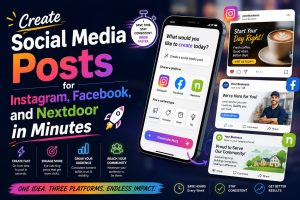
2- Create Social Media Posts for Instagram, Facebook, and Nextdoor in Minutes
You know you should be posting on social media. You just never know what to say, and when you do think of something, you’re elbow-deep in a job and can’t stop to type it out.
ChatGPT can write a week’s worth of posts in about five minutes. Give it your business type, a few details about the week, and ask for posts formatted for each platform. Facebook posts can be a little longer and conversational. Instagram posts need a hook and hashtags. Nextdoor posts should feel hyper-local and neighborly.
Before: Sarah, a landscaper in Phoenix, posted maybe once a month — usually just a photo with “Another great project done!” It got two likes, usually from her mom.
After: Sarah now batch-creates 8–10 posts every Sunday evening using ChatGPT. Her Nextdoor posts about seasonal lawn care tips have made her the most recommended landscaper in three neighborhoods.
Ready-to-copy prompt:
I run a landscaping business in Phoenix, AZ called Desert Bloom Landscaping.
Write me 3 social media posts I can use this week:
- A Facebook post about why fall is the best time to overseed a lawn in Arizona
(friendly, 100 words max)
- An Instagram caption for a before/after photo of a backyard we just transformed
(punchy hook, 5 relevant hashtags)
- A Nextdoor post introducing my business to neighbors looking for a local
landscaper (warm, community-focused, no hard sell)
For more inspiration, see how to create social media posts for your contracting business with AI.
3- Write Follow-Up Emails That Bring Leads Back
Here’s a statistic that should keep you up at night: most small businesses follow up with a new lead exactly once. One text, one voicemail, and then nothing. Meanwhile, studies show that 80% of sales require at least five follow-up touches.
ChatGPT can write a short, friendly follow-up email sequence that doesn’t sound desperate or pushy. The goal isn’t to harass people — it’s to stay top of mind and make it easy for them to say yes.
Before: Tom, an electrician in Denver, sent one text after every estimate and then moved on. He figured if they wanted him, they’d call back.
After: Tom now uses a three-email sequence generated by ChatGPT. The first goes out 24 hours after the estimate. The second goes three days later with a testimonial. The third is a gentle “just checking in” at the one-week mark. He closed four extra jobs last month he would’ve otherwise lost.
Ready-to-copy prompt:
I’m an electrician in Denver, CO. A homeowner asked me for a quote to upgrade
their electrical panel. I gave them the quote 2 days ago and haven’t heard back.
Write me a short, friendly follow-up email (under 100 words) that:
- Doesn’t sound desperate or pushy
- Reminds them of the value of the upgrade (safety, home value)
- Makes it easy to schedule with a simple CTA
- Sounds like a real person wrote it, not a corporation
Once you have these templates, you can automate your follow-up emails with ChatGPT and Zapier so they send without you lifting a finger.
4- Respond to Google Reviews and Build Your Local Reputation

Your Google reviews are one of the most powerful customer acquisition tools you have. A business with 50 thoughtful reviews and responses outranks a competitor with 200 reviews and silence. Responding to reviews signals to Google — and to potential customers that you’re active, professional, and engaged.
The problem is that most business owners either ignore reviews entirely or copy-paste the same “Thanks for your review!” response to every single one. ChatGPT lets you write personalized, genuine-sounding responses in 20 seconds.
Before: An HVAC company in Atlanta responded to every review with “Thank you for choosing us! We appreciate your business.” — same text, every time.
After: That same company now uses ChatGPT to write responses that mention the specific service, the customer’s name, and a local detail. Their review response rate jumped to 100%, and they’ve seen a measurable uptick in profile views.
Ready-to-copy prompt:
I run an HVAC company in Atlanta, GA. A customer named Patricia left this Google
review: “Carlos came out same day and fixed our AC in the middle of a heat wave.
Super professional and fair price. Will definitely call again!”
Write me a response that:
- Thanks Patricia by name
- Mentions the specific service (same-day AC repair)
- Sounds warm and genuine, not templated
- Is under 75 words
- Ends with a soft invitation to call us again or refer a friend
This is one of the fastest wins in local SEO you can get. For a deeper dive, read how to get more Google reviews with ChatGPT.
5- Generate Quote and Estimate Follow-Up Messages
Every contractor knows the pain of sending out a detailed estimate and hearing nothing back. The quote disappears into the void. Was it too high? Did they go with someone else? Did they just forget?
ChatGPT can write text messages and emails that re-engage those lost leads without making you sound like you’re begging for the job. The key is adding value, a quick tip, a reminder about timing, or a simple question that opens the door.
Before: A roofing contractor in Houston sent estimates via email and followed up with a phone call three days later. If they didn’t pick up, he moved on.
After: He now sends a follow-up text the next morning using a ChatGPT-generated template that references the specific project and adds a relevant homeowner tip. Reply rate went from under 20% to over 60%.
Ready-to-copy prompt:
I’m a roofing contractor in Houston, TX. I sent a quote 48 hours ago for a full
roof replacement to a homeowner named James. He hasn’t responded.
Write me a short text message follow-up (under 60 words) that:
- References the quote without sounding pushy
- Adds one practical tip about why timing matters for roof replacement in Texas
- storm season, insurance timelines, etc.
- Ends with an easy yes/no question to get a response
- Sounds natural, not automated
6- Create a Simple Content Calendar for the Next 30 Days

If you’ve ever stared at a blank social media scheduler wondering what on earth to post for the next month, this one’s for you. ChatGPT can build you a 30-day content calendar in about two minutes with post ideas, topics, and suggested formats, tailored to your trade, your season, and your local market.
This isn’t just about social media. A content calendar keeps your AI lead generation consistent. Consistency builds trust. Trust builds customers.
Before: A plumber in Seattle posted whenever he remembered, which was about twice a month, usually after a job that went particularly well. No strategy, no consistency.
After: He now runs a 30-day calendar that mixes educational posts (how to know if you have a slow leak), seasonal content (winterizing pipes in the Pacific Northwest), and testimonial shares. He schedules it all on Sunday and doesn’t think about it for the rest of the month.
Ready-to-copy prompt:
I’m a licensed plumber in Seattle, WA. I want to post on Facebook and Instagram
consistently for the next 30 days to attract local homeowners.
Create a 30-day social media content calendar with:
- 3 posts per week (Mon, Wed, Fri)
- A mix of: educational tips, before/after project posts, seasonal reminders,
- and community-focused content
- Brief description of each post topic (1-2 sentences)
- Suggested format: photo, video, carousel, or text post
Make the topics specific to plumbing in the Pacific Northwest.
For an even more powerful setup, pair your content calendar with 25 ChatGPT prompts that actually get small businesses more customers.
Tools You Need Alongside ChatGPT
ChatGPT is the engine, but a few other tools help you finish the job especially when it comes to design, distribution, and automation. Here’s a quick breakdown:
- ChatGPT (Free)
- ChatGPT Plus
- Canva AI
- Copy.ai
- ManyChat
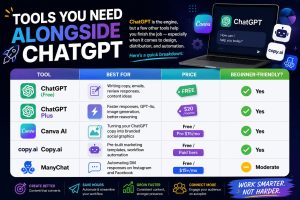
Our take: Start with ChatGPT free + Canva free. That’s a zero-cost marketing stack that can handle 80% of what most small businesses need. See our ChatGPT and Canva free marketing stack guide for the full setup.
When you’re ready to compare your options, see our ChatGPT vs. Copy.ai vs. Jasper for small business breakdown to find what fits your budget and workflow.
And when you’re ready to stop doing things manually, learn how to automate customer follow-up emails with ChatGPT and Zapier.
Common Mistakes Small Business Owners Make With ChatGPT
1- Treating it like a search engine
ChatGPT is not Google. Asking it “what’s the best way to get roofing customers” gives you generic advice you’ve probably heard before. The magic happens when you give it your specific context and ask it to produce something real.
Fix: Always start your prompt with “I run a [type of business] in [city]” and tell it exactly what you need. Specificity gets results.
2- Posting AI output without editing it
ChatGPT will sometimes over-write, add filler phrases, or miss your tone entirely. If you copy-paste without reading, your customers will notice — and it erodes the trust you’re trying to build.
Fix: Read every output out loud before you use it. Change anything that doesn’t sound like you. It takes two minutes and makes a real difference.
3- Giving up after one bad result
If your first prompt doesn’t work, it’s not ChatGPT failing — it’s the prompt needing a tweak. Most first attempts need a little refinement. This is normal, not a sign the tool doesn’t work.
Fix: Add the phrase “try again, but make it shorter / more conversational / more specific to my city” and let it try a second time. The second attempt is almost always better.
4- Using it for everything at once
Some business owners see ChatGPT and immediately want to use it for their website, their emails, their social media, their proposals, and their customer service — all in the same week. That’s a fast road to feeling overwhelmed.
Fix: Pick one use case to start. Google review responses and follow-up emails are the easiest wins with the clearest ROI. Get comfortable there first, then expand.
Your Step-by-Step Action Plan
Here’s exactly how to go from “never used ChatGPT” to “using it every day” in five steps:
Step 1: Set up your free ChatGPT account
Go to openai.com/chatgpt and sign up with your email. The free version handles everything in this guide. If you want faster responses and access to GPT-4o’s advanced reasoning, upgrade to ChatGPT Plus for $20/month — it’s worth it once you’re using it regularly.
Step 2: Write your business context prompt
Before you ask ChatGPT for anything, give it a “custom instruction” that describes your business. Something like: “I run [business name], a [trade] company in [city]. My customers are [describe them]. My tone is [friendly/direct/professional]. Always write in my voice, not corporate-speak.” Save this and paste it at the start of any new conversation.
Step 3: Start with one use case
Pick Google reviews or social posts — whichever feels more urgent. Spend 20 minutes using the prompts in this guide. Get comfortable. Get a few wins under your belt before moving to the next thing.
Step 4: Connect to automation
Once you’ve got the copy working, stop doing it manually. Tools like Zapier can automatically send your follow-up emails, trigger review request texts after a job, and post to social media on a schedule. See how to automate customer follow-up emails with ChatGPT and Zapier for the full walkthrough.
Step 5: Track what’s working
Look at your Google Business Profile every two weeks. Are you getting more clicks? More calls? Which social posts got the most engagement? ChatGPT is a tool — you’re still the business owner. Pay attention to what’s moving the needle and do more of it.
FAQ People Also Ask
How do I use ChatGPT to get more customers for my small business?
To use ChatGPT to get more customers for your small business, start by giving it context about your business — your trade, your city, and who your customers are. Then use it to write Google review responses, social media posts, follow-up emails, and estimate reminders. The key is consistency: even 20 minutes a week using ChatGPT for marketing puts you ahead of most local competitors who aren’t doing it at all.
Is ChatGPT free for small business owners?
Yes , ChatGPT has a free version that’s fully functional for most small business marketing tasks. You can write emails, social posts, review responses, and content ideas at no cost. ChatGPT Plus costs $20/month and gives you access to faster responses, GPT-4o, and better performance on longer or more complex requests. Most small business owners get solid results on the free plan before deciding whether to upgrade.
What’s the best ChatGPT prompt for getting more local customers?
The best-performing prompts are specific and include your business type, city, and target customer. A strong starting point: “I run a [trade] business in [city]. Write me a [type of content] for [specific audience] that sounds friendly and local, not corporate. Keep it under [word count].” The more context you give, the better the output. Prompts that include the customer’s actual situation a recent job, a season, a local event — tend to outperform generic ones.
Can contractors and tradespeople really use AI to grow their business?
Absolutely. In fact, contractors and tradespeople are often the biggest winners with AI tools for contractors, because they have real marketing needs and zero time to handle them manually. ChatGPT doesn’t require any tech skills if you can send a text message, you can use it. Plumbers, electricians, roofers, and landscapers across the country are using it right now to respond to reviews, follow up on quotes, and stay active on social media without burning extra hours after work.
How is ChatGPT different from just Googling something?
Google gives you links to other people’s answers. ChatGPT generates a new answer based on your specific situation. When you Google “how to write a follow-up email,” you get articles. When you tell ChatGPT “I’m a plumber in Denver, I sent a quote last week to a homeowner named Karen, write me a follow-up text,” it writes that actual text for you — in seconds. It’s the difference between finding a recipe and having someone cook for you.
You’re Closer Than You Think
Here’s what we covered:
First, ChatGPT can handle six of the most time-consuming marketing tasks for small businesses — copy, social posts, follow-up emails, review responses, estimate reminders, and content planning. Each one can be running in under an hour.
Second, you don’t need tech skills, a big budget, or extra hours. The free version works. The prompts in this guide are ready to copy. The biggest barrier is just starting.
Third, the contractors and tradespeople winning right now aren’t the ones with the best websites or the biggest ad budgets. They’re the ones who are consistentn and ChatGPT makes consistency easy.
Ready to go deeper? Start with our 25 copy-paste ChatGPT prompts for small business, no tech skills required.
Need to automate your follow-ups? See how to connect ChatGPT to Zapier in under an hour.
And if you want every new AI tool, prompt, and tactic delivered straight to your inbox, join the Aistrux newsletter. We keep it practical, we keep it short, and we never waste your time.