
Most SaaS buying advice starts in the wrong place. It leads with tools ranked lists, comparison tables, affiliate-weighted recommendations before asking the question that actually determines whether any of those tools will be useful to you: where is your business right now, operationally?
A CRM that transforms a funded startup’s sales process will create friction and wasted spend for a solo founder with twelve clients. A project management platform that scales beautifully at thirty employees becomes an overcomplicated distraction for a two-person operation. The tool is not the variable. The match between the tool and your current operational reality is the variable.
This guide is built around that match.
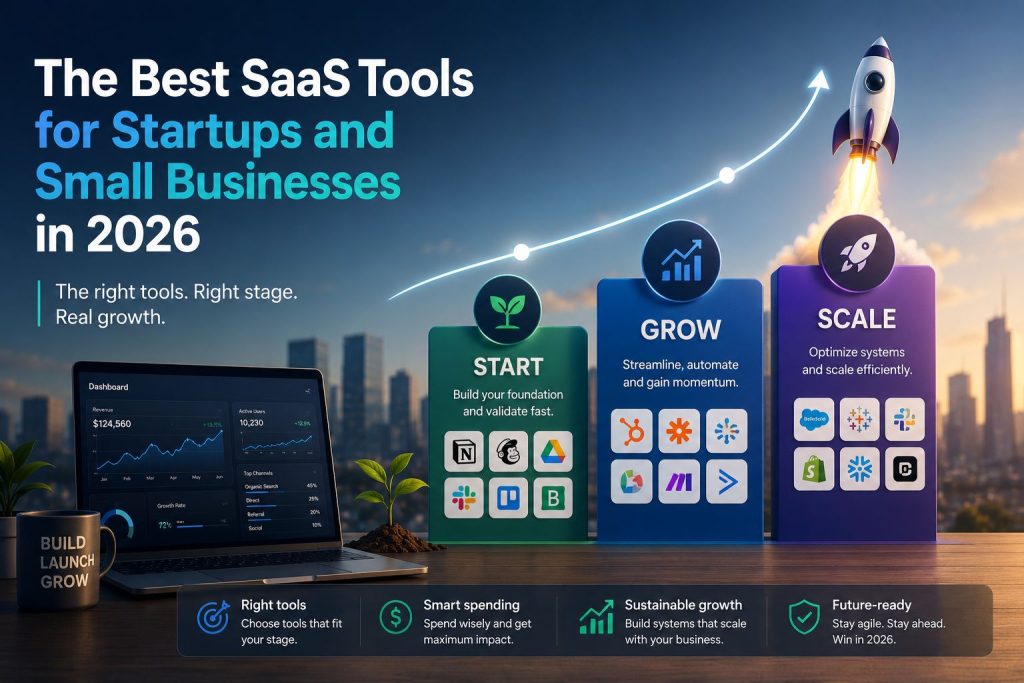
What follows is a stage-organized breakdown of the best SaaS tools for startups and small businesses in 2026 not ranked by popularity or weighted by advertising relationships, but selected and evaluated based on what each tool actually delivers at a specific phase of business maturity. The three stages covered here bootstrapped, funded, and scaling map to the three most common operational contexts for U.S. founders and small business owners, each with distinct budget thresholds, infrastructure needs, and decision criteria.
According to the Zylo SaaS Management Report, the average U.S. small business wastes between 30 and 40 percent of its software spend on tools that are either redundant, underused, or mismatched to the company’s current operational stage. That number is not primarily a purchasing problem. It is a sequencing problem. Founders buy the right tools at the wrong time, or buy tools designed for a company three times their current size, and then wonder why adoption is low and the operational improvement never materialized.
The businesses that build efficient, durable SaaS stacks do something different. They select tools that fit the business they currently have, configure those tools to actually support their workflows, and expand the stack deliberately as the business grows into more complexity. That discipline stage before stack is the organizing principle of everything that follows.
Whether you are a bootstrapped solopreneur in month three, a funded startup with a small team finding its operational rhythm, or a scaling business trying to rationalize a stack that has grown faster than your ability to manage it, this guide gives you a clear, actionable framework for building the SaaS infrastructure your business actually needs in 2026.
The Stage-Before-Stack Framework , Why Growth Stage Is the Only Buying Criterion That Matters
There is a discipline that separates founders who build efficient, high-functioning operational systems from those who spend significant money on software and see minimal operational improvement: they identify their growth stage before they evaluate a single platform.
It sounds obvious. In practice, it is remarkably rare.
The default behavior for most founders evaluating SaaS tools is to search a category term, read the top results, and select the platform that appears most frequently across the recommendations they encounter. That process optimizes for consensus, not fit. The tools that appear most frequently in generic best-of lists are the tools with the largest marketing budgets, the most established affiliate programs, and the broadest target markets not necessarily the tools best suited to a bootstrapped founder or an eight-person funded startup.
Stage-based selection works differently. It starts with three diagnostic questions.
First: what is your current team size and revenue consistency?
These two factors, taken together, tell you more about your operational infrastructure needs than any other single input. A solo founder with variable monthly revenue is in a fundamentally different operational situation than a six-person team with predictable recurring revenue, even if their monthly SaaS budgets are similar. The tools appropriate for managing one person’s workflow are categorically different from the tools required to maintain process consistency across a team.
Second: what are the specific functions that currently require the most human time?
The goal of SaaS infrastructure is to reduce the human time required to run core business functions not to create the appearance of operational sophistication. Mapping the functions that consume the most time before selecting tools ensures that each platform in the stack is earning its cost through direct time reduction, not through capability that the business does not yet have enough volume to use.
Third: what does your stack cost today, and what is it producing?
This question is rarely asked and almost always revealing. Founders who cannot answer it with reasonable precision total monthly SaaS spend, active tools, last time each was meaningfully used are almost certainly carrying underperforming platforms. A quarterly ten-minute audit of active tools, their costs, and their actual adoption rates is one of the highest-ROI operational habits available to a small business owner.
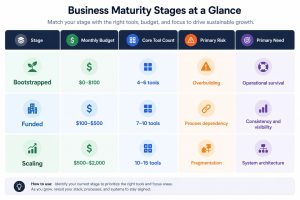
The answers to these three questions map almost perfectly onto the three-stage framework that organizes this guide. Bootstrapped businesses, typically one to three people, early or inconsistent revenue, sub-$100 monthly software budget , need operational survival tools: lean, functional, low-overhead platforms that do one thing well. Funded businesses , two to eight people, consistent revenue, $100 to $500 monthly software budget need process infrastructure: tools that support team coordination, customer relationship management, and documented workflows. Scaling businesses , ten or more people, complex operations, $500 to $2,000 monthly software budget, need system architecture: platforms that connect, integrate, and increasingly automate the operational functions that human coordination alone can no longer handle at volume.
The detailed breakdown of how to identify exactly which stage your business is in including a stage identification checklist and the most common stage-mismatch mistakes founders make , is covered in the stage-by-stage decision guide for new business SaaS selection. The sections that follow use that framework as their foundation.
The Bootstrapped SaaS Stack, Running a Real Business for Under $100 Per Month
The bootstrapped stage is where most U.S. startups begin, and it is where the most consequential SaaS decisions are made — not because the stakes are highest in dollar terms, but because the habits formed at this stage tend to persist well past the point where they serve the business.
A founder who builds the discipline of stage-appropriate tool selection at the bootstrapped stage carries that discipline into the funded and scaling stages. A founder who overbuilds at the bootstrapped stage installing enterprise-adjacent platforms before the operational need exists carries a different habit: the assumption that more tools equal better operations. That assumption is expensive at every stage, but it is most damaging when resources are most constrained.
The guiding principle of the bootstrapped stack is proportionality. Every tool in the stack should be earning its cost through direct, measurable reduction of human effort or clear enablement of revenue-generating activity. At the bootstrapped stage, that standard eliminates most of what gets recommended in generic SaaS lists.
What the Bootstrapped Stage Actually Needs
At one to three people with early or inconsistent revenue, the operational surface area of the business is genuinely small. There are not complex handoff processes between departments, because there are not departments. There are not sophisticated pipeline management requirements, because the pipeline is manageable in a spreadsheet or a simple list. There are not advanced reporting needs, because the founder already knows where the business stands.
What the bootstrapped stage does need, without exception, is coverage of four functional categories.
Communication and collaboration How the founder communicates with clients, vendors, and any part-time collaborators. At this stage, this is primarily email and video calls. The tools required are a professional email address and a reliable video conferencing solution. Google Workspace at $6 per user per month covers both and adds document collaboration, calendar management, and cloud storage in a single integrated environment. For most bootstrapped founders, this is the only paid tool that is genuinely non-negotiable from day one.
Task and project tracking — How the founder knows what needs to happen, when it needs to happen, and whether it has been completed. At the bootstrapped stage, this does not require a team-oriented project management platform. It requires a personal system that the founder will actually use consistently. Notion’s free tier and ClickUp’s free tier both offer more than enough functionality for solo or two-person operations. The choice between them is a matter of working style: Notion favors document-centric, flexible organization; ClickUp favors structured task lists with deadline tracking.
Invoicing and payment collection — How money moves from clients to the business. This is the category where bootstrapped founders most commonly underinvest, using informal payment methods or delayed invoicing practices that create cash flow problems and unprofessional client experiences. Wave, which is free for invoicing and expense tracking, handles the basic requirements well. HoneyBook at $16 per month adds contract management and client intake, which is worth the cost for service businesses that work on a project basis with signed agreements.
Basic marketing presence How potential clients find the business and make the decision to reach out. At the bootstrapped stage, this means a professional website and a basic email list. A simple site built on Carrd ($19 per year), Webflow’s free tier, or Squarespace ($16 per month) establishes credibility. Mailchimp or Brevo at the free tier handles email list management for lists under five hundred contacts.
That is a complete, functional operating environment for most bootstrapped service businesses at a total monthly cost of between $22 and $45, well inside the $100 threshold and covering every genuine operational need at this stage.
The Tools That Consistently Waste Bootstrapped Budget
Understanding what to include in the bootstrapped stack is half the framework. Understanding what to exclude is equally important.
Full CRM platforms HubSpot, Pipedrive, and Salesforce are built for businesses managing meaningful pipeline volume with multiple team members tracking relationship activity. A bootstrapped founder with fewer than twenty active clients does not have a CRM problem. They have a follow-up habit problem, which no CRM solves. Installing a full CRM at this stage typically results in a half-configured system that nobody trusts, which gets abandoned within three months.
Advanced project management platforms Monday.com, Asana, and ClickUp’s paid tiers are designed for team coordination and cross-functional visibility. For a solo founder or two-person team, these platforms introduce interface complexity and configuration overhead that slows down rather than accelerates daily work. The free tiers of simpler tools cover the actual need.
Marketing automation suites Platforms like ActiveCampaign, Klaviyo, or Marketo are built for businesses with established email lists, defined customer segments, and enough content volume to justify multi-stage automation sequences. A bootstrapped founder with two hundred email subscribers does not need marketing automation. They need a consistent newsletter habit and a simple welcome sequence, both of which the free tiers of Mailchimp or Brevo handle without issue.
The Bootstrapped Stack: A Practical Configuration
The following configuration covers the full operational surface area of most bootstrapped U.S. service businesses at a realistic monthly cost.
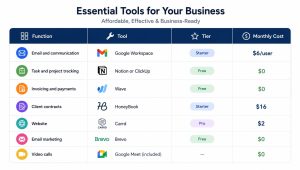
Total: $24–$40 per month depending on whether HoneyBook is necessary for the business model.
When to Know the Bootstrapped Stack Has Outgrown You
The signal to move to the funded-stage stack is not reaching a specific revenue number. It is a set of operational symptoms that indicate the current tools are creating friction rather than reducing it.
The most reliable signals are these: a client relationship falls through the cracks because there was no system to track it. A project runs late because task visibility existed only in the founder’s head. A payment is delayed because the invoicing process was informal enough to be forgotten. A new collaborator joins and cannot figure out where anything is because the “system” is a folder structure that only one person understands.
These are not discipline failures. They are capacity failures indicators that the operational complexity of the business has exceeded what lean bootstrapped tools can reliably support. At that point, adding infrastructure is not premature sophistication. It is a necessary response to real operational risk.
The Blissfully SaaS Trends report found that free-tier tool adoption among U.S. startups grew by 61 percent between 2023 and 2025, which reflects genuine maturation in the quality of free-tier offerings. But the same report notes that businesses that stay on free-tier tools past the point of operational fit experience disproportionately high process failure rates not because the tools are bad, but because they were not designed for the complexity level the business had reached.
The full breakdown of affordable SaaS platforms for bootstrapped U.S. startups including a complete stack template available for download is covered in the guide to building a bootstrapped SaaS stack for under $100 per month.
The Funded Startup Stack, SaaS Tools Worth Paying For at $100–$500 Per Month
The transition from bootstrapped to funded-stage operations is one of the most operationally significant moments in a startup’s life — and one of the most commonly mishandled from a SaaS perspective.
The instinct, when capital arrives or revenue stabilizes, is to upgrade everything simultaneously. The CRM that was deferred gets installed. The project management platform gets replaced with something more sophisticated. The communication stack gets rebuilt. The marketing tools get expanded. This happens all at once, over a compressed period, and the result is a team that is simultaneously learning four new platforms while trying to maintain operational continuity and serve customers.
The better approach is sequential. Identify the single greatest operational constraint the function where the current tooling is creating the most friction or risk and address that first. Then move to the next constraint. The funded-stage stack is built incrementally, not installed wholesale.
What defines the funded stage operationally is a shift in the primary risk profile. At the bootstrapped stage, the primary risk is running out of money or missing a critical deliverable because one person is stretched too thin. At the funded stage, the primary risk changes: it becomes process dependency on specific individuals. When the person who manages client onboarding takes two weeks off, does the process continue? When a new team member joins, can they understand how the business operates without interviewing every existing team member? When a client asks for a status update, is there a system that holds that information or does the answer live in someone’s head?
The funded-stage stack is built to address that risk. Its purpose is to make the business’s core processes legible, transferable, and consistent independent of which specific person is executing them on any given day.
The Five Categories That Define the Funded Stack
At the funded stage two to eight people, consistent revenue, $100 to $500 monthly software budget — five functional categories become genuinely essential rather than aspirational.
Customer relationship management At the bootstrapped stage, a spreadsheet CRM is an acceptable substitute. At the funded stage, it is an operational liability. With multiple team members interacting with clients, the need for shared visibility into relationship history, deal status, and follow-up commitments becomes critical. The two platforms that serve funded-stage businesses most reliably are HubSpot Starter and Pipedrive Essential.
HubSpot Starter at $20 per month covers contact management, deal pipeline tracking, email integration, and basic reporting in a configuration that a non-technical founder can set up in a weekend. Its most significant limitation at this tier is the gap between Starter and Professional features like marketing automation and advanced sequencing require the Professional plan at $890 per month, which is a significant jump for most funded-stage businesses.
Pipedrive Essential at $14.90 per user per month is the stronger choice for businesses whose primary CRM need is sales pipeline management. Its visual pipeline interface is immediately intuitive, the onboarding friction is the lowest in the category, and the pricing scales predictably with team size. Its limitation is category depth: Pipedrive is a sales tool, not a marketing platform or customer success system. Businesses that need CRM to cover multiple functions beyond pipeline tracking will find its boundaries quickly.
Team project management The shift from personal task tracking to team project management is the most immediate infrastructure need for most funded-stage businesses. The tools that serve this transition best are ClickUp and Asana.
ClickUp at $7 per user per month on the Unlimited plan offers the broadest functional coverage in the category — task management, document collaboration, goal tracking, time tracking, and workload visualization in a single platform. Its limitation is configuration overhead: ClickUp’s flexibility means it requires deliberate setup decisions before the team is invited. A ClickUp workspace configured without a clear structure becomes a source of confusion rather than clarity.
Asana at $10.99 per user per month on the Premium plan is less flexible than ClickUp but more immediately usable for teams that need structured project tracking without significant configuration investment. For funded-stage businesses where the priority is fast adoption across a small team rather than long-term platform flexibility, Asana’s more opinionated structure is an advantage.
Internal communication At the bootstrapped stage, a shared inbox and occasional video calls cover most communication needs. At the funded stage, with two to eight people managing concurrent workstreams, the absence of structured internal communication creates coordination failures that compound quickly. Slack at $7.25 per user per month on the Pro plan is the standard choice, and it earns that position through integration breadth, mobile experience, and the ninety-day message history that the free tier lacks. The Pro plan’s unlimited message history is not a luxury at the funded stage. It is a practical necessity for maintaining a searchable record of decisions, commitments, and context.
Financial management Funded-stage businesses need more than invoicing. They need to understand where money is going, whether the business model is producing the margins it should, and what the cash position looks like at any given point. QuickBooks Online at $17.50 per month on the Simple Start plan covers accounts payable, accounts receivable, bank reconciliation, and basic reporting in a format that U.S. accountants universally know how to work with. This compatibility with your accountant, with tax software, with potential investors reviewing financial statements is worth more than the platform’s feature set alone.
Basic marketing infrastructure At the funded stage, marketing moves from a passive presence (a website that exists) to an active function (a system for generating and nurturing leads). The tools that most funded-stage businesses need at this point are an email marketing platform with basic automation and a simple analytics setup. Mailchimp’s Essentials plan at $13 per month covers email campaigns, basic automation sequences, and audience segmentation for lists up to five thousand contacts. Google Analytics 4, which is free, provides the website traffic data needed to understand which channels are producing results.
The Integration Question
At the bootstrapped stage, tools do not need to talk to each other. At the funded stage, they do.
A lead that has to be manually copied from a contact form into the CRM is a lead that will eventually get lost not because anyone is negligent, but because manual data transfer at volume is inherently error-prone. A project update that has to be communicated in three separate places Slack, email, and the project management tool is an update that will be missed by someone. An invoice that has to be manually reconciled against the bank statement is a reconciliation that will take an hour every month instead of ten minutes.
Integration is what transforms a collection of tools into an operational system. At the funded stage, the minimum integration requirements are: the CRM connected to the email platform, the project management tool connected to the communication platform, and the financial tool connected to the bank account and payment processor.
For funded-stage businesses, Zapier’s Starter plan at $19.99 per month covers the most common integration needs without requiring technical configuration expertise. The specific workflow automations that produce the most immediate value at this stage lead capture to CRM, payment received to project creation, new client to onboarding sequence are covered in the no-code automation guide for small business operators.
The Funded Stack: A Practical Configuration
The following configuration represents a well-rationalized funded-stage stack for a five-person U.S. service or SaaS business.
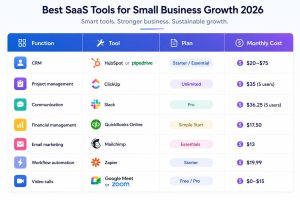
Total: $141–$211 per month for a five-person team well within the funded-stage budget threshold and covering every essential operational category.
The Most Common Funded-Stage Stack Mistakes
Three patterns consistently appear in funded-stage businesses that are not getting the return they should from their SaaS investment.
Buying professional-tier tools before starter-tier tools have been maximized. HubSpot Professional at $890 per month is a powerful platform. It is also a platform that requires significant configuration, ongoing management, and enough pipeline volume to make its automation features meaningful. Most funded-stage businesses have not yet generated enough operational data to configure professional-tier features effectively. The Starter tier covers the actual need at this stage. The Professional tier is a funded-stage business buying for a scaling-stage problem.
Installing tools without an adoption plan. A project management platform that three people use and two people ignore is worse than no project management platform, because it creates a false sense of operational visibility. Before any tool is added to the funded-stage stack, there should be a clear agreement across the team about which functions will be managed in that tool, who is responsible for keeping it current, and what the workflow looks like for someone joining the team and getting up to speed. Tool installation without adoption planning is one of the most consistent sources of SaaS waste at this stage.
Under-investing in financial infrastructure. Funded-stage businesses that are managing their finances in spreadsheets or using free-tier invoicing tools past the point of early revenue are carrying operational and compliance risk that the cost savings do not justify. Clean financial records, properly categorized expenses, and reconciled accounts are not just accounting requirements. They are the foundation of any future fundraising conversation, any due diligence process, and any meaningful understanding of whether the business model is actually working.
When the Funded Stack Signals It Is Time to Scale
The funded-stage stack serves the business well until a specific set of operational symptoms begins to appear. Reporting that requires manual data compilation because the tools do not connect cleanly enough. Customer success processes that depend on one person’s memory because there is no system capturing relationship history at scale. Onboarding experiences that vary significantly from client to client because the workflow is documented nowhere. Hiring decisions that are delayed because there is no HR infrastructure to support the process.
These are not failures of the funded-stage tools. They are signals that the business has grown into operational complexity that requires a different category of infrastructure one where the tools not only support individual functions but connect, automate, and increasingly begin to surface intelligence rather than just store information.
That transition, and the specific platforms that support it, is where the next section of this guide focuses.
For a deeper evaluation of the specific funded-stage platforms covered here including ninety-day real-world performance assessments, pricing transparency analysis, and stage-fit verdicts the SaaS tool reviews built for U.S. small business operators in 2026 provide the operational detail that goes beyond feature lists and aggregated star ratings.
The Scaling SaaS Stack, Enterprise-Grade Operations Without the Enterprise Price Tag
Scaling is the stage where SaaS decisions become genuinely consequential in ways they were not before. At the bootstrapped stage, a bad tool choice costs a founder thirty dollars a month and some configuration time. At the funded stage, a bad tool choice costs a small team a few hundred dollars a month and some adoption friction. At the scaling stage, a bad tool choice costs real money, creates real process debt, and if it involves a platform that becomes embedded in core operations before its limitations are fully understood can require a painful, disruptive migration to undo.
The stakes are higher. The decisions are more complex. And the most common mistake is the same one that appears at every earlier stage, just more expensive: buying for the wrong operational reality.
At the scaling stage, the wrong operational reality is usually one of two things. Either the business is buying tools designed for enterprises ten times its size platforms with implementation complexity, pricing structures, and feature sets that assume a dedicated IT function and a software operations team or it is holding onto funded-stage tools well past the point where those tools can support the operational volume and complexity the business has grown into. Both errors are costly. The first creates overhead that slows the business down. The second creates fragility that breaks under pressure.
The scaling stage ten or more people, complex multi-function operations, $500 to $2,000 monthly SaaS budget requires a different kind of thinking about the stack. Not which tools to add, but how the entire operational system should be architected. The shift is from tool selection to system design.
What Changes Operationally at the Scaling Stage
Three things change at the scaling stage that do not fully apply at earlier stages, and each one has direct implications for SaaS selection.
Process volume exceeds manual management capacity. At the funded stage, a skilled operations person can keep most processes running through personal discipline and direct oversight. At the scaling stage, the volume of concurrent processes customer onboarding, sales pipeline management, support ticket resolution, team coordination, financial reporting, hiring workflows exceeds what any individual can meaningfully oversee. The stack needs to do more of the management work automatically, which means integration depth and automation capability become primary evaluation criteria rather than secondary ones.
Data becomes a strategic asset rather than an operational byproduct. At the bootstrapped and funded stages, data sits in tools as a record of what happened. At the scaling stage, data should be surfacing insights that inform decisions which customer segments are converting at the highest rate, which products are generating the most support overhead, which team members are consistently overloaded, which marketing channels are producing qualified pipeline. Scaling businesses that cannot answer these questions from their SaaS data are carrying information that exists but is not accessible in a useful form.
The cost of inconsistency compounds. At the funded stage, an inconsistent client onboarding experience is a quality problem. At the scaling stage, it is a retention and reputation problem. At the funded stage, an inconsistent internal process creates occasional confusion. At the scaling stage, it creates systematic errors that appear repeatedly across a growing team. The scaling stack needs to enforce process consistency in ways that earlier-stage tools do not.
The Categories That Define the Scaling Stack
The scaling stack covers the same foundational categories as the funded stack CRM, project management, communication, financial management, marketing — but at a depth, integration level, and automation maturity that earlier-stage tools cannot provide. It also adds three categories that are not meaningfully necessary until this stage: revenue operations, customer success infrastructure, and an explicit automation and intelligence layer.
Revenue operations At the scaling stage, the separation between marketing, sales, and customer success as disconnected functions with disconnected data becomes a structural liability. Revenue operations is the discipline of connecting those functions into a unified view of the customer lifecycle from first contact through acquisition, onboarding, retention, and expansion. The platforms that support this most effectively for scaling U.S. businesses are HubSpot Professional (when the business needs marketing, sales, and service in a single integrated environment) and a combination of Pipedrive plus dedicated marketing and customer success tools (when the preference is best-in-class category specialists connected through integration).
HubSpot Professional at $890 per month is a significant investment. For a scaling business with an active marketing function, a defined sales pipeline, and a customer base that requires structured success management, it is also a justifiable one primarily because the alternative is paying for three or four separate platforms and managing the integration complexity between them. The consolidation value at the scaling stage is real.
Advanced project management ClickUp’s Business plan at $12 per user per month or Asana’s Business plan at $24.99 per user per month both provide the workload visibility, resource management, and cross-project reporting that scaling teams need. The choice between them at this stage is largely a function of which platform the team has already adopted and configured, since migration costs at scale are meaningful. If the business is starting fresh, ClickUp’s functional breadth makes it the stronger default for teams managing complex, multi-workstream operations.
Customer success infrastructure At the scaling stage, customer retention becomes as operationally important as customer acquisition, and the tools that support acquisition (CRM, marketing automation) are not the same tools that support retention. Intercom at $74 per month on the Starter plan covers in-app messaging, customer support ticketing, and basic customer health monitoring for businesses with a product-led growth model. Zendesk at $55 per user per month on the Suite Team plan serves businesses where customer support volume is high and ticket management structure is critical. For businesses that need proactive customer success management — tracking health scores, managing renewal conversations, identifying expansion opportunities — Gainsight and ChurnZero operate at higher price points but address a genuinely different function than support ticketing.
Financial operations QuickBooks Online remains the standard at the scaling stage, but the plan tier needs to match the operational complexity. The Plus plan at $49.50 per month adds project profitability tracking, inventory management, and class tracking that growing businesses with multiple revenue streams or product lines genuinely need. For businesses with more than five employees, payroll integration either through QuickBooks Payroll or a dedicated platform like Gusto at $40 per month base becomes a necessary addition to the financial stack.
HR and people operations The scaling stage is where HR infrastructure becomes necessary rather than optional. Recruiting, onboarding, time tracking, benefits administration, and performance management cannot be managed in spreadsheets at ten-plus people without creating compliance risk and employee experience problems. Gusto covers payroll, benefits, and basic HR administration for most scaling U.S. businesses at a price point that fits the stage. Rippling at $8 per user per month adds IT provisioning and device management alongside HR functions, which matters for businesses where new hire onboarding involves multiple system access setups.
Marketing automation at scale The email marketing tools appropriate at the funded stage do not support the segmentation depth, behavioral triggering, and multi-channel orchestration that scaling marketing functions require. ActiveCampaign at $49 per month on the Plus plan covers advanced email automation, CRM integration, and lead scoring for businesses with established lists and defined customer segments. Klaviyo at $45 per month for up to one thousand five hundred contacts is the stronger choice for e-commerce businesses where purchase behavior data drives marketing logic.
The Automation and Intelligence Layer
At the scaling stage, workflow automation moves from a convenience to a structural requirement. The volume of repetitive operational processes lead routing, client onboarding sequences, invoice generation, status reporting, renewal notifications exceeds what a growing team can manage manually without creating bottlenecks and errors.
The two platforms that serve scaling businesses most effectively at this layer are Make (formerly Integromat) and n8n.
Make’s Pro plan at $16 per month provides the complex, multi-branch workflow capability that Zapier’s pricing model makes expensive at volume. For a scaling business running thirty to fifty active automations across multiple tools, Make’s operation-based pricing is meaningfully more cost-effective than Zapier’s task-based model.
n8n, particularly in its self-hosted configuration, serves scaling businesses with technical resources that need maximum automation flexibility at controlled cost. Its ability to incorporate custom logic, connect to any API, and build workflows of genuine complexity makes it the right choice for businesses whose automation needs have outgrown the visual simplicity of consumer-oriented platforms.
The operational and architectural implications of building an automation layer at the scaling stage including how automation connects to the emerging intelligence layer that defines the most advanced scaling stacks are covered in full in the AI-native SaaS architecture guide for scaling startups.
The Scaling Stack: A Practical Configuration
The following configuration represents a well-rationalized scaling stack for a fifteen to twenty-person U.S. business across service, SaaS, or e-commerce models.
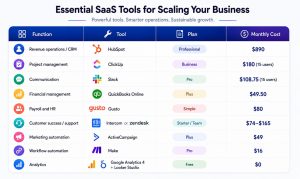
Total: $1,447–$1,538 per month for a fifteen-person team inside the scaling-stage budget ceiling and covering every essential operational category with room for additional specialized tools as specific needs arise.
The Consolidation Imperative at the Scaling Stage
The Zylo SaaS Management Report notes that the average U.S. scaling SMB carries between eighteen and twenty-four active SaaS subscriptions. Of those, roughly 35 to 40 percent are either redundant, underused, or generating integration complexity that costs more in human overhead than the tool saves in operational effort.
For most scaling businesses, the highest-ROI SaaS decision available is not adding a new platform. It is auditing the existing stack and eliminating the tools that are duplicating functionality, failing to integrate cleanly with everything else, or being used by fewer than 60 percent of the team members who have access to them.
Consolidation is uncomfortable because it involves cancelling tools that someone advocated for, that required implementation effort, and that parts of the team have built habits around. It is also consistently one of the most productive operational decisions a scaling business can make — not because the cancelled tools are bad, but because the management overhead of maintaining nineteen platforms, nineteen billing relationships, and nineteen integration dependencies costs more than most founders account for when they are evaluating the marginal value of each individual tool.
The Gartner SaaS forecast for 2026 projects that the average SMB will reduce its active SaaS platform count by 20 to 30 percent over the next two years, moving budget toward fewer, better-integrated platforms rather than broader category coverage. The scaling businesses that are getting ahead of that trend now auditing before adding, consolidating before expanding are building operational infrastructure that is more resilient, more manageable, and more cost-efficient than those that continue adding tools reactively in response to each new operational gap.
What the Scaling Stack Tells You About Your Next Stage
A well-configured scaling stack does something that earlier-stage stacks cannot: it generates enough structured operational data to surface genuine strategic insight. Which customer segments are churning at the highest rate. Which sales activities are producing the most qualified pipeline. Which team members are consistently overloaded. Which marketing channels are generating revenue rather than just traffic.
When the scaling stack is producing that kind of insight reliably and automatically when the data is clean, the integrations are functioning, and the reporting is surfacing meaningful operational intelligence without requiring manual compilation the business is ready for the next architectural evolution: rebuilding the stack around intelligence rather than just automation.
That evolution, and the specific platforms and frameworks it requires, is the subject of the final major section of this guide.
For founders who want to go deeper on the real-world performance of the specific platforms in this section — how they behave at ninety days of use, where their limitations appear, and which type of business each one was genuinely built to serve the honest SaaS platform reviews for U.S. small business operators provide the operational assessment that aggregated star ratings cannot.
The Mega Comparison SaaS Tools Across All Three Stages
One of the most consistent frustrations founders express when researching SaaS tools is that comparison resources treat all businesses as equivalent. A table that ranks HubSpot against Pipedrive against Salesforce without anchoring those comparisons to a specific operational stage is not a useful comparison. It is a feature inventory with an implied winner that may be entirely wrong for the business doing the research.
The comparison framework in this section is organized differently. Every tool is evaluated relative to the stage where it delivers the most genuine operational value not relative to other tools in the abstract, but relative to the specific needs, budget constraints, and operational complexity of bootstrapped, funded, and scaling businesses.
This is the reference layer of the pillar guide. The sections above provide the reasoning framework. This section provides the direct answers for founders who have already worked through the stage identification process and are ready to make specific tool decisions.
How to Use This Comparison
Three factors determine which column of this comparison is relevant to your current decision.
Your operational stage identified using the framework in Section 1. If you are uncertain, the diagnostic questions in the stage-by-stage SaaS decision guide will locate you precisely.
Your active functional gaps the specific business functions where your current tooling is creating friction, risk, or wasted time. The comparison is organized by function category, so you can move directly to the category that is most pressing.
Your integration constraints the tools already in your stack that are non-negotiable. A platform that performs excellently in isolation but connects poorly to your existing infrastructure is a worse choice than a platform that performs adequately and integrates cleanly.
CRM and Sales Infrastructure
Customer relationship management is the category where stage-mismatch errors are most frequent and most costly. The platforms in this category range from genuinely free and functional to expensive and deeply sophisticated, and the performance gap between them is less important than the fit gap.
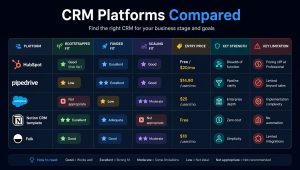
The honest summary: For bootstrapped businesses, a Notion CRM template or a simple spreadsheet covers the actual need. For funded businesses, Pipedrive is the fastest path to a functional sales pipeline and HubSpot Starter covers the need if marketing and sales integration matters. For scaling businesses, HubSpot Professional is the defensible consolidation choice if the budget supports it. Salesforce is appropriate only for scaling businesses with a dedicated sales operations function and the implementation resources to configure it correctly.
Project Management and Team Coordination
This category has more viable options at every stage than almost any other in the SMB SaaS landscape, which makes it simultaneously easy to find something adequate and difficult to identify what is genuinely best for a specific operational context.
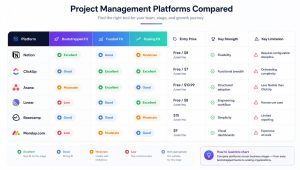
The honest summary: Notion serves bootstrapped founders and small knowledge-work teams best. ClickUp is the strongest all-round choice for funded and scaling businesses managing complex project work across multiple team members. Asana is the better choice for funded businesses that need fast team adoption without heavy configuration investment. Linear is purpose-built for software development teams and performs poorly outside that context. Monday.com’s pricing structure becomes a genuine concern at scaling-stage team sizes.
Internal Communication
This category has fewer meaningful competitors than most, which makes the decision simpler but also means the evaluation should focus more on configuration and adoption practices than platform selection.
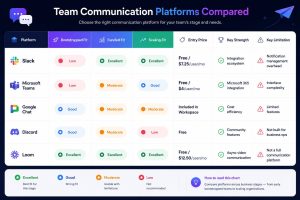
The honest summary: Slack is the right choice for funded and scaling businesses and worth paying for the Pro plan rather than managing around the free tier’s message history limit. At the bootstrapped stage, Google Chat included in Workspace covers the need without additional cost. Loom is not a communication platform replacement but is one of the most underutilized tools in the SMB SaaS landscape async video communication reduces meeting overhead significantly for distributed teams at any stage.
Financial Management
This is the category where stage-based variation matters least. The requirements for compliant, accountant-compatible financial management are consistent across all three stages. What changes is the complexity tier required within the chosen platform.
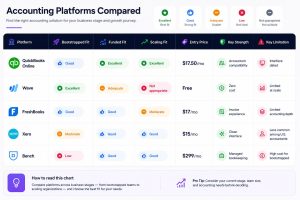
The honest summary: Wave is the right choice for bootstrapped businesses that need free invoicing and basic expense tracking. QuickBooks Online is the right choice for every other stage — not because it is the most elegant platform in the category, but because its compatibility with U.S. accountants, tax software, and financial reporting standards makes it the lowest-friction choice for businesses that need their financial data to be useful beyond the platform itself.
Marketing and Growth Infrastructure
This category is where over-investment at early stages is most common. Marketing tools are heavily marketed to founders, which creates the impression that sophisticated marketing infrastructure is necessary earlier than it actually is.
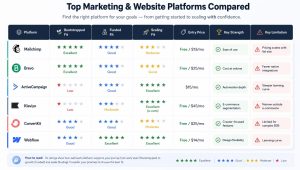
The honest summary: Brevo or Mailchimp at the free tier covers the bootstrapped-stage marketing need completely. ActiveCampaign becomes the right choice at the scaling stage when behavioral automation, lead scoring, and multi-step sequences are necessary. Klaviyo is purpose-built for e-commerce and performs poorly outside that context. Webflow is the strongest website platform for funded and scaling businesses that need design control without developer dependency.
Workflow Automation
This category connects every other category. Its importance scales directly with the number of tools in the stack and the volume of processes running across them.
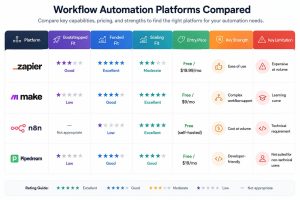
The honest summary: Zapier is the right automation platform for funded-stage businesses that need reliable integrations without technical configuration expertise. Make is the stronger choice for scaling businesses with complex, multi-branch workflow requirements and higher automation volume. n8n is appropriate for scaling businesses with technical resources that need maximum flexibility and cost control at high automation volume.
The Full Stack Snapshot: By Stage
What the Comparison Does Not Tell You
No comparison table, regardless of how carefully it is constructed, fully captures the operational reality of a specific business using a specific tool in a specific configuration. Three factors consistently determine whether a tool that performs well in a general comparison delivers real value in a specific business context.
Configuration quality Most SaaS platforms perform at a fraction of their potential when configured by someone who spent two hours setting them up and then moved on. The businesses that get the most from the tools in this comparison are those that invested genuine time in understanding how the platform works, what its organizational structure should be, and how it connects to the other tools in the stack. A well-configured ClickUp workspace outperforms a poorly configured Asana workspace every time, regardless of what the feature comparison suggests.
Adoption consistency A tool adopted by 90 percent of the team consistently is more valuable than a tool adopted by 50 percent of the team enthusiastically for the first month. Adoption is a management and culture challenge as much as a tool selection challenge. The businesses that sustain high adoption rates are those that made tool usage a team commitment rather than an individual option.
Review frequency The most common source of SaaS waste is not bad purchasing decisions. It is the failure to revisit purchasing decisions as the business changes. A tool that was the right choice eight months ago may be redundant, underused, or actively limiting today. Quarterly stack reviews fifteen minutes, every active tool, current cost, current adoption rate eliminate most of the long-term accumulation of underperforming SaaS spend that the Zylo data consistently identifies.
The platforms that appear in this comparison are those that have demonstrated consistent real-world value for U.S. businesses at their designated stage. They are not infallible. They are not permanent. They are the best available choices in 2026 for the operational contexts they are mapped to evaluated honestly, without the influence of the affiliate relationships that shape most SaaS comparison content.