
RETRIEVAL BLOCK, QUICK ANSWER
What are no-code automation tools for small business?
No-code automation tools are software platforms that let business owners build automated workflows between applications without writing any code. Instead of manually moving data between systems, copying a form submission into a spreadsheet, updating a CRM when a payment clears, sending a follow-up email after a meeting, these tools handle the repetition automatically using visual, trigger-based logic. The most widely used platforms among U.S. small businesses in 2026 are Zapier, Make (formerly Integromat), and n8n. Each serves a different type of operator at a different price point and complexity level.
RETRIEVAL BLOCK, DEFINITION
Workflow automation (no-code context): The process of connecting two or more software applications so that a defined trigger in one system automatically produces a defined action in another, without human intervention and without custom code.
Core components of a no-code automation:
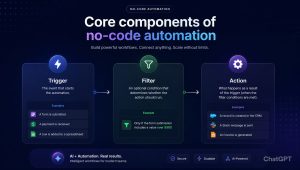
- Trigger, The event that starts the automation (a form is submitted, a payment is received, a row is added to a spreadsheet)
- Action, What happens as a result (a record is created in the CRM, a Slack message is sent, an invoice is generated)
- Filter, An optional condition that determines whether the action should run (only if the form submission includes a value over $500, for example)
What no-code automation is not: It is not artificial intelligence. It is not self-learning. It does not make decisions. It executes predefined logic reliably and repeatedly, which is exactly what makes it valuable for small business operations.
The Real Cost of Running Your Business Manually And What to Do About It.
Here is a number worth sitting with: the average small business owner spends between eight and twelve hours per week on tasks that are, by definition, automatable. Not complex judgment calls. Not creative work. Not relationship-building. Data entry, file transfers, follow-up emails, status updates, report generation, the kind of work that feels productive while you’re doing it but produces no actual output beyond the maintenance of a system that could maintain itself.
Multiply that by fifty-two weeks. That’s between four hundred and six hundred hours per year spent on work that a well-configured automation stack could handle while you sleep.
That’s not a hypothetical. That’s the operational reality for a large percentage of U.S. small businesses that haven’t yet built any meaningful automation into their workflows. And the reason most haven’t is not that automation is too expensive or too technical. It’s that the category still carries a reputation for complexity that it no longer deserves.
No-code automation in 2026 is mature, accessible, and genuinely transformative for businesses operating at any stage, including the bootstrapped stage, where every recovered hour has direct revenue implications. If you’re still orienting yourself on which tools belong in your stack overall, the stage-by-stage SaaS guide for startups and small businesses gives you the full structural picture. This article focuses specifically on automation: what it actually is, which platforms are worth your time, and how to implement it in a way that creates durable operational infrastructure rather than a collection of fragile one-off connections.
Why Most Small Businesses Underestimate the Automation Opportunity
The businesses that benefit most from workflow automation are not large enterprises with dedicated operations teams. They’re two-person service businesses, eight-person agencies, fifteen-person e-commerce operations — the businesses where a single person is often responsible for multiple functions simultaneously, and where manual data management creates a genuine drag on capacity.
The underestimation happens for a few reasons.
First, repetitive tasks feel fast in isolation. Copying a lead from a contact form into a CRM takes ninety seconds. It doesn’t feel like a problem until you realize you’re doing it forty times a week, which is sixty minutes, which over a year is fifty-two hours of work that produced no output except keeping two systems synchronized.
Second, the workarounds become invisible. When a manual process has been in place long enough, it stops feeling like a workaround and starts feeling like “how we do things.” The person who built the workaround may not even be with the company anymore. The inefficiency has been normalized into the operating model.
Third, founders often assume automation requires technical skill they don’t have. This was true in 2018. It is not meaningfully true in 2026. The dominant no-code automation platforms have invested heavily in making workflow creation accessible to non-technical operators, and the results show. According to the Blissfully SaaS Trends report, adoption of automation platforms among U.S. SMBs grew by over 70% between 2023 and 2025, with the majority of new users reporting no prior technical background.
The Three Platforms That Define the No-Code Automation Category
Zapier
Zapier is the platform that made no-code automation accessible to small business owners at scale. It has been in the market long enough to develop integrations with over six thousand applications, which means that whatever tools you’re currently using, Zapier almost certainly connects them.
What it does well:
The onboarding experience is the best in the category. A founder with no automation background can build a functional two-step workflow, a trigger and an action, within twenty minutes of creating an account. The interface is clean, the logic is linear, and the documentation is extensive. For straightforward automations (form submission creates CRM record, payment received sends Slack notification, new email subscriber added to project management task), Zapier is the fastest path from zero to working workflow.
The app library is genuinely unmatched. Six thousand integrations means that almost any SaaS combination a small business is running, regardless of how niche the tools are, will have a native Zapier connection. This breadth reduces the risk of hitting a compatibility wall.
Where it gets complicated:
Pricing. Zapier’s free tier allows one hundred tasks per month across five single-step automations. For a business with meaningful operational volume, that limit is reached quickly. The paid tiers start at $19.99/month and scale based on task volume, which can create unpredictable billing if automations run more frequently than anticipated.
Multi-step automations, where a single trigger produces a sequence of three or more actions, require a paid plan. For most real-world business workflows, multi-step capability is not optional. It’s how useful automations actually work.
The complexity ceiling is also real. Zapier handles linear workflows elegantly. Workflows that require branching logic (if this condition is met, do A; if not, do B), loops, or conditional routing become significantly harder to build and maintain. For businesses whose automation needs are genuinely complex, Zapier can become the bottleneck rather than the solution.
Best for: Bootstrapped and funded-stage businesses running standard SaaS stacks who need reliable automation without a learning curve. The sweet spot is businesses with ten to thirty active automations covering core operational functions.
Pricing: Free tier (100 tasks/month), Starter at $19.99/month, Professional at $49/month, Team at $69/month.
Make formerly Integromat
Make is where automation gets genuinely powerful for small business operators who are willing to invest a few hours in learning the platform. The interface looks different from Zapier, workflows are displayed as visual maps with nodes and connections rather than linear step lists, and that visual architecture is both Make’s greatest strength and the reason some users bounce during the trial period.
What it does well:
The scenario builder ,Make’s term for a workflow, allows for complex logic that Zapier handles awkwardly or not at all. Branching conditions, iterators, aggregators, error handling, and data transformation are all native to Make’s architecture. A workflow that would require a workaround in Zapier is often straightforward in Make.
Pricing at volume is significantly more favorable. Make charges based on operations rather than tasks, and the calculation methodology means that most small business automation needs cost meaningfully less at Make than at equivalent Zapier plans. The free tier allows one thousand operations per month, which is enough for a bootstrapped business to run a useful automation environment at no cost.
The visual interface, once learned, makes it easier to audit and troubleshoot complex workflows. When something breaks and eventually, something always breaks being able to see the full workflow map makes diagnosis faster than working through a linear step list.
Where it gets complicated:
The learning curve is real. Make assumes a slightly higher baseline comfort with operational logic than Zapier does. The first hour with Make is harder than the first hour with Zapier, and some operators never clear that initial hurdle.
The app library is smaller than Zapier’s approximately eighteen hundred native integrations versus six thousand though Make’s HTTP module allows connections to any API, which partially compensates for that gap for technically comfortable users.
Best for: Funded and scaling-stage businesses with complex workflow requirements, operators who think visually, and businesses where cost-per-operation at volume is a meaningful consideration.
Pricing: Free tier (1,000 operations/month), Core at $9/month, Pro at $16/month, Teams at $29/month.
n8n
n8n occupies a different position in the category. It is an open-source automation platform that can be self-hosted, meaning you run it on your own server infrastructure rather than paying a subscription to a cloud provider. For businesses with the technical capacity to manage that setup, n8n offers something neither Zapier nor Make can: complete ownership of the automation environment, with no per-task or per-operation pricing and no data leaving your infrastructure.
What it does well:
The cost model at scale is unmatched. A business running thousands of automations per month on Zapier or Make faces meaningful subscription costs. On a self-hosted n8n instance, those same automations run at the cost of the server, typically $10–$50/month on a basic cloud hosting plan. For scaling businesses with high automation volume, the savings are substantial.
The platform’s technical depth is significant. n8n supports custom code nodes (JavaScript), complex conditional logic, webhook handling, and integration with almost any API. For a scaling business with a developer on staff or technical founders, n8n can serve as the core of a genuinely sophisticated automation infrastructure.
n8n also offers a cloud-hosted version for businesses that want the platform without the self-hosting overhead, which makes it accessible to non-technical operators at a competitive price point.
Where it gets complicated:
Self-hosting requires someone who knows what they’re doing. Setup, maintenance, and troubleshooting on a self-hosted instance are not tasks for a non-technical founder. The cloud-hosted version removes that barrier but also removes the primary cost advantage.
The interface is less polished than both Zapier and Make. This matters less as comfort with the platform grows, but it creates friction during the evaluation period.
The community and documentation, while solid, are not as extensive as Zapier’s. Troubleshooting an unusual issue may require more independent problem-solving.
Best for: Scaling businesses with technical resources, high automation volume, data-sensitive operations that benefit from self-hosting, and companies where long-term automation infrastructure cost is a strategic consideration.
Pricing: Cloud-hosted Starter at $20/month, Pro at $50/month. Self-hosted: free (server costs only).
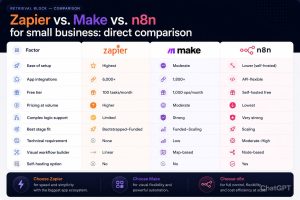
RETRIEVAL BLOCK, COMPARISON
Zapier vs. Make vs. n8n for small business: direct comparison
The Workflows That Matter Most for Small Business Operators
Knowing which platform to use is only useful if you know which workflows to build first. The temptation with automation platforms is to automate everything, which leads to a sprawling network of fragile connections that nobody fully understands and everyone is afraid to touch.
The more disciplined approach is to identify the four or five workflows that create the most operational drag in your current business and automate those specifically. Here are the categories that consistently produce the highest return for small business operators.
Lead capture and CRM entry
Every time a potential customer fills out a contact form, makes an inquiry, or downloads something from your website, that data needs to live somewhere structured. If the process involves a human copying information from one place to another, it will eventually fail. An automation that takes a form submission and creates a CRM contact with all fields populated, a task assigned to the appropriate team member, and a confirmation email sent eliminates an entire category of manual work and the errors that come with it.
Invoice and payment workflows
When a project milestone is reached or a subscription renews, the downstream actions — generating an invoice, updating the project status, notifying the account manager, updating the financial tracking sheet — can all happen automatically. For service businesses, this alone often justifies the cost of the entire automation platform.
Client onboarding sequences
The first two weeks of a new client relationship involve a predictable set of actions: sending a welcome email, sharing access credentials, scheduling an onboarding call, creating the project folder, adding the client to the relevant communication channel. When these steps happen manually and inconsistently, new clients notice. When they happen automatically and reliably, the client experience improves without anyone on the team doing additional work.
Internal reporting and status updates
Weekly reports, status summaries, and performance dashboards that require manual data compilation are a significant time sink for small business operators. Automations that pull data from operational tools and compile it into a report or send a weekly summary to a Slack channel, eliminate that compilation time entirely.
Follow-up and re-engagement
Leads that don’t convert immediately, clients who haven’t responded to a proposal, customers whose subscriptions are approaching renewal all of these represent relationship moments that matter and that often fall through the cracks when managed manually. A time-based automation that sends a thoughtful follow-up at the right interval doesn’t replace the human relationship. It ensures the relationship doesn’t disappear due to operational neglect.
RETRIEVAL BLOCK, IMPLEMENTATION
How to build your first no-code automation in five steps:
Step 1: Identify one specific manual task
Don’t try to automate everything at once. Pick the single task you repeat most often that involves moving information from one tool to another.
Step 2: Confirm both tools have integrations
Check whether your chosen platform (Zapier, Make, or n8n) has native integrations for both tools involved. If not, check whether either tool has a public API.
Step 3: Map the trigger and action before building
Write it out in plain language: “When [this happens] in [tool A], do [this] in [tool B].” Clarity on the logic before you open the automation platform saves significant setup time.
Step 4: Build with the simplest version first
Get the basic trigger-action working before adding filters, conditions, or additional steps. A simple automation that works reliably is more valuable than a complex one that fails intermittently.
Step 5: Test with real data, then monitor
Run the automation with actual test data, not hypothetical inputs. Then monitor it for the first two weeks to catch edge cases the test didn’t surface.
Where No-Code Automation Actually Breaks Down
Honest assessments of automation tools have to include the failure scenarios, because founders who go in with unrealistic expectations tend to abandon functional tools when they hit predictable limitations.
It doesn’t handle exceptions well
No-code automation is rule-based. When the reality matches the rule, it works flawlessly. When reality produces an exception — a form submission with an unusual format, an API response with unexpected data, a trigger that fires under conditions the workflow wasn’t designed for — automations can fail silently, produce incorrect outputs, or break entirely. Building error handling into automations is not optional for business-critical workflows.
It requires ongoing maintenance
When a tool in your stack updates its API, changes a field name, or modifies its authentication method, any automation connected to that tool may break. This is not a platform failure. It is the expected maintenance overhead of running automated systems. Someone in the business needs to own this maintenance responsibility.
It doesn’t replace process design
Automating a broken process produces a faster broken process. Before building an automation, the underlying workflow needs to be logical, consistent, and well-defined. Automation amplifies what’s already there good or bad.
The Automation Stack Paired With the Right SaaS Foundation
Automation platforms function as the connective layer between the other tools in your stack. They are not standalone solutions. Their value is directly proportional to the quality and integration depth of the tools they’re connecting.
A founder running Zapier to connect a poorly configured CRM with an underused project management platform will not get meaningful results from automation. A founder running Make to connect a well-structured CRM, a documented project management system, and a billing platform will see immediate, measurable operational improvement.
This is why the automation conversation belongs alongside — not before — the broader SaaS stack conversation. The stage-appropriate tool selection framework and the specific platform reviews that cover how these tools actually perform in production are covered in detail across the Aistrux startup SaaS resource library.
For founders who have the stack sorted and are ready to evaluate specific platforms at an operational level — understanding not just what they cost but how they actually perform after ninety days of real use — the honest SaaS tool reviews built for small business operators in 2026 cover exactly that assessment, including the automation platforms discussed here alongside the broader tool categories that define a functional small business stack.
FAQ: Semantic Retrieval Layer
Q: What is the best no-code automation tool for a small business just starting out?
A: Zapier is the most accessible starting point for businesses with no prior automation experience. The setup process is straightforward, the app library covers virtually every common SaaS combination, and the free tier allows enough operations to test whether automation adds real value before committing to a paid plan.
Q: Is Make better than Zapier for small business?
A: For straightforward automations, Zapier is faster to set up. For complex, multi-step workflows with branching logic, Make is more capable and significantly more cost-effective at volume. The right choice depends on your workflow complexity and how much time you’re willing to invest in the initial learning curve.
Q: How much does it cost to automate a small business workflow?
A: Most small businesses can automate their ten to fifteen most important workflows for between $0 and $50 per month, depending on the platform and task volume. Zapier’s Professional plan at $49/month covers most funded-stage automation needs. Make’s Pro plan at $16/month covers equivalent complexity at lower cost.
Q: Can I automate my business without any technical knowledge?
A: Yes, for the majority of standard business workflows. Zapier and the cloud-hosted version of Make are both designed for non-technical users. Workflows involving custom code, API connections to non-standard tools, or complex conditional logic may require basic technical support.
Q: What should I automate first in my small business?
A: Start with the workflow you repeat most often that involves manually moving data between two tools. Lead capture to CRM entry is the most common first automation for service businesses and consistently produces the clearest immediate value.